| First Published 6 Nov 2026 |
|---|

The new CornerRadius property has begun rolling out to the Beta channel starting with version 2611 build 20625.20032 released 2026-11-02.
This allows users to have rounded corners on various form controls. Initially, the feature has been limited to textboxes.
However, it will soon be extended to other controls such as labels, combo boxes, listboxes, command buttons and rectangles.
The CornerRadius property is an integer data type with a theoretical maximum value of 32767.
However, the rounding has been constrained to a maximum 30-degree arc so the limit is far less in practice. The actual limit depends on the control size.
If a form with rounded control corners is opened in an older Access version, the corner radius property is ignored and the control corners will be square.
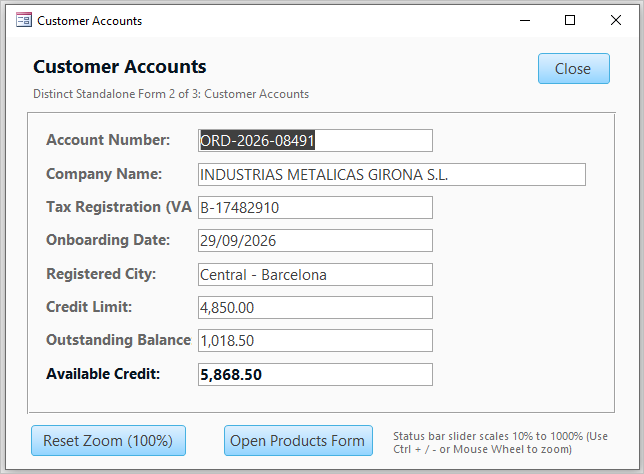
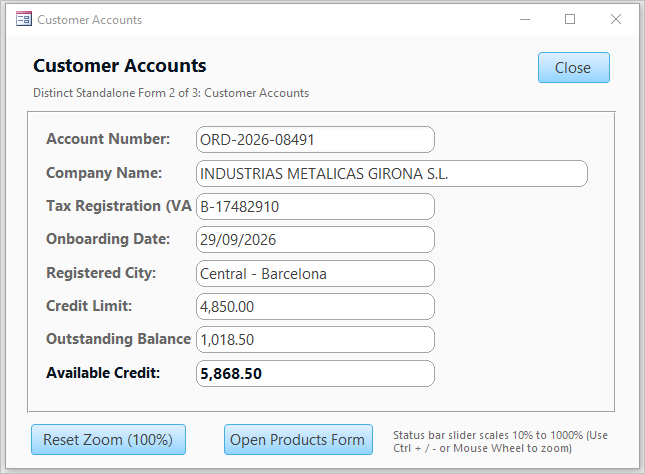
The two screenshots below show the same form with no control rounding and with a corner radius of 8.
| Corner Radius = 0 (no rounding) | Corner Radius = 8 |
|---|---|
 |
 |
The corner radius value can be set from the property sheet for the control. By default, the value is set to zero.
Corner Radius Property set to 4
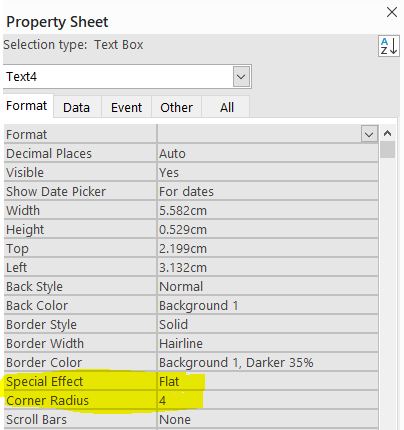
NOTE: Rounded corners are only applied where the Special Effect property is set to the default value, Flat. For all other Special Effect settings, the corners will always be square.
The rounding is applied outside the existing control boundaries. This means that the control spacing may need to be increased if the CornerRadius value is quite large.
Design View - rounding outside control boundaries
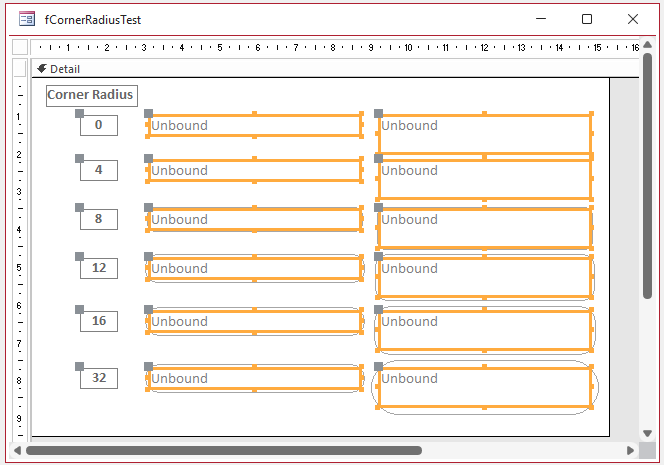
This was a design decision. If the rounding had been applied inside the control boundaries, it would have resulted in part of the control text being obscured.
Another design decision was to limit the rounding to a maximum 30-degree arc. This means that the curvature stops increasing after a certain point even with larger corner radius values.
For example in the example form shown below, with the shorter textboxes on the left, the rounding is identical for corner radius values of 16 and 32 as the constraint limit has been reached.
With the taller textboxes on the right, the curvature limit is not met until the corner radius is about 32.
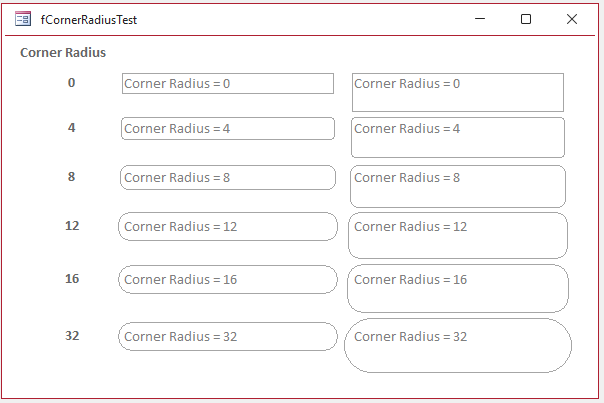
The CornerRadius property value can also be set using code. For example: Me.txtCustomer.Properties("CornerRadius") = 12
Further Comments
The new CornerRadius property appears to work well and provides a more modern user experience, similar to that found on many websites.
As with any new feature in the Beta channel, the CornerRadius property may include some bugs.
If you discover any issues with this new feature, please email me using the link below and I will inform the Access team.
Feedback
Please use the Email button in the contact form below to let me know whether you found this article useful or if you have any questions.
Please also consider making a donation towards the costs of maintaining this website. Thank you
| Colin Riddington | Mendip Data Systems | Last Updated 6 Nov 2026 |
|---|
|
Return to Access Blog Page
|
Return to Top
|