
First Published 15 Dec 2025 Last Updated 13 Apr 2026 Difficulty Level: Moderate
Test database - version 1.9 Module code - version 36
Section Links:
Why Use Line Numbers?
Module Code
Known Issues / Limitations
Downloads
Acknowledgements
YouTube Videos
Feedback
Why Use Line Numbers? Return To Top
Line numbers are not used by default in the VBA code used in Microsoft Access and other Office apps. However, they can be very useful when debugging code during development work.
Getting information about the line number where the error occurred makes it much easier to identify and fix the problem, particularly in long or complex procedures. For example:

Many developers, including myself, use line numbers extensively during development work. Line numbers are included in all code modules of the example Northwind template database.

Line numbers can be added manually or by using VBE add-ins such as
VBE_Extras or MZ-Tools. They are also used as an integral part of the vbWatchdog error handling utility.

However, despite their undoubted usefulness for debugging purposes, there are a significant number of experienced developers who intensely dislike the use of line numbers.
Following discussion about using line numbers in an Access MVP email group back in 2023, former Access team member, Geoffrey Griffith, published code to remove all line numbers from an Access database. The code largely worked well but unfortunately didn't preserve line indentations or handle GoTo / GoSub (number} statements.
I have since extensively modified his code and the updated version now preserves any line indentations when line numbers are removed.
The updated version also handles hard coded line numbers in GoTo & GoSub statements e.g. GoSub 100, On Error GoTo 130.
In addition, the updated code can also be used to remove line numbers from specified procedures or code modules.
On the principle of HHCIB (how hard can it be!), I also decided to work on the more challenging task of adding line numbers to a procedure, code module or an entire project.
Doing this is much more complex as the code needs to take into account all the cases where line numbers are not allowed. For example:
• The entire declarations section including Option statements, APIs, Type / Enum statements, consts, conditional compilation etc
• Procedure start & end lines
• Conditional compilation used in procedure headers or variables
• Comment lines starting with an apostrophe (') or the old style Rem statements
• Line labels – lines ending in ':'
• The first Case line in Select Case statements
• All except the first line in line continuations
• Variable definitions - Dim, Public etc (except where delimited by a colon ':' with data following)
If you have either VBE_Extras or MZ-Tools, you can use these tools to easily remove or edit line numbers.
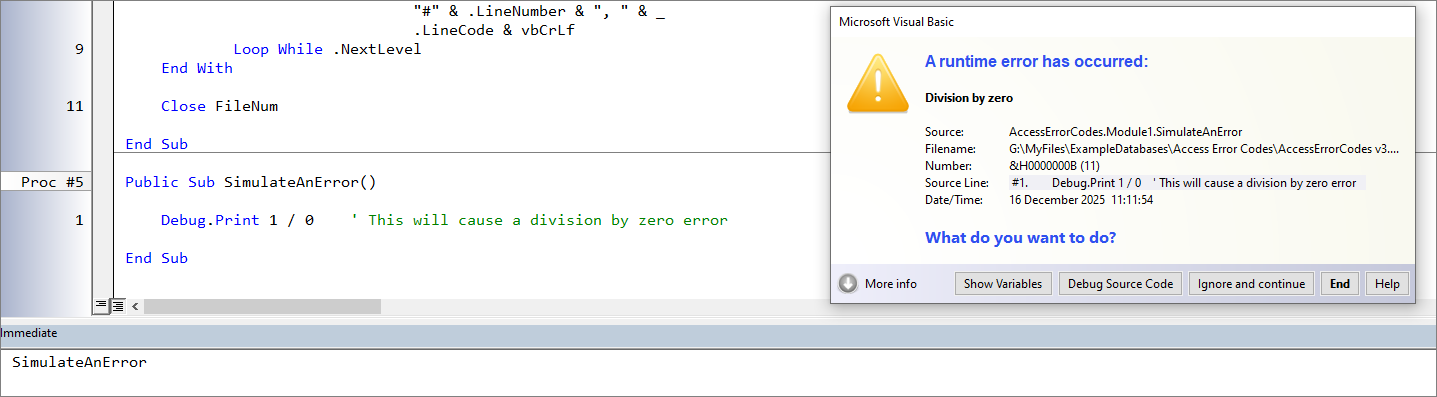
The vbWatchdog utility works in a different way by making use of the built-in VBA line numbers that are not normally exposed to view.
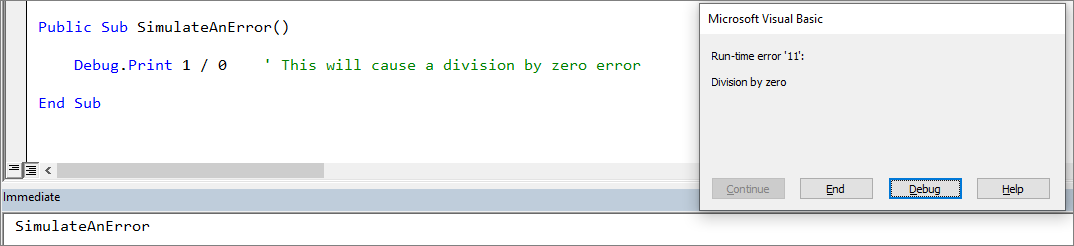
For example, this is a standard Access error message for a division by zero error:
The next screenshot shows how vbWatchdog handles the same error:
Personally, I would strongly recommend purchasing one or more of these VBE add-ins as they provide significant additional functionality (in addition to line numbering) at a very reasonable price.
However, if you do not want to purchase any of those tools just to remove / add line numbers then you can use the free line numbering code supplied with this article.
Module code Return To Top
The module modLineNumbers contains three procedures. The first two allow you to add or remove line numbers in a specified procedure, module or the entire VBA project:
• RemoveLineNumbers (Optional strModule As String = "", Optional strProc As String = "", Optional blnInclude As Boolean = False)
• AddLineNumbers (Optional strModule As String = "", Optional strProc As String = "")
The third procedure SaveVBAModule was provided by Xevi Batlle and is used to automatically save each code module after line numbers have been added or removed.
Import the modLineNumbers module into your own applications. You can choose to use early or late binding.
Using early binding, you will also need to add two references: Microsoft Visual Basic for Applications Extensibility and Microsoft Scripting Runtime.
If you are happy to use late binding, no additional references are required.
The code has been extensively tested and hopefully will not cause any problems. However, I recommend that you test the code on a backup copy of your own applications.
Typical usage:
a) Remove line numbers from all code modules (EXCEPT modLineNumbers): RemoveLineNumbers OR RemoveLineNumbers , , False
b) Remove line numbers from ALL code modules (INCLUDING modLineNumbers): RemoveLineNumbers , , True
c) Add line numbers to all code modules (EXCEPT modLineNumbers): AddLineNumbers
NOTE: This may cause Access to hang in very large databases with many code modules. It may be safer to do one module at a time in such cases.
d) Add line numbers to module modErrorList: AddLineNumbers "modErrorList"
e) Add line numbers to code module for report rptAccessErrorCodes: AddLineNumbers "Report_rptAccessErrorCodes"
f) Remove line numbers from module modFunctions: RemoveLineNumbers "modFunctions"
g) Add line numbers to code module for form frmCustomerOrders: AddLineNumbers "Form_frmCustomerOrders"
h) Add line numbers to procedure cboError_NotInList in form frmAccessErrorCodes: AddLineNumbers "Form_frmAccessErrorCodes", "cboError_NotInList"
i) Remove line numbers from procedure Resize in module modResizeForm: RemoveLineNumbers "modResizeForm", "Resize"
CODE:
Option Compare DatabaseOption Explicit'--------------------------------------------------------------------------------------------------------------' Module: modLineNumbers' Author: Colin Riddington (isladogs)' Company: Mendip Data Systems' Website: https://www.isladogs.co.uk' Contributors: Xevi Batlle, Geoffrey Griffith, John Mallinson' Purpose: Add / remove line numbers in a specified procedure, module or project.' Code Version: 36' Last Updated: 14/12/2025' Copyright: The code in this module MAY be altered and reused in your own applications' provided the copyright notice is left unchanged (including Author, Website and Copyright)' You are NOT allowed to sell, resell or repost this on other sites such as online forums' without permission from the author. However, links back to the above website ARE allowed.' If you find this code useful, please place a link to my website on your own website so' that others may benefit as well.'--------------------------------------------------------------------------------------------------------------' Can be used with either early or late binding#Const EarlyBinding = False 'set True for early binding#If EarlyBinding Then ' ####################################################################### ' NOTE: ' 1. Line numbering code requires a reference to: ' Microsoft Visual Basic for Applications Extensibility ' 2. Dictionary object requires a reference to: ' Microsoft Scripting Runtime ' ####################################################################### Dim vbProj As VBIDE.VBProject Dim vbComp As VBIDE.VBComponent Dim modCurrent As VBIDE.CodeModule Dim ProcKind As VBIDE.vbext_ProcKind Dim dict As New Scripting.Dictionary #Else 'Reference to Microsoft Scripting Runtime not required Public dict As Object ' Reference to Microsoft Visual Basic for Applications Extensibility NOT required Dim vbProj As Object 'VBIDE.VBProject Dim vbComp As Object 'VBIDE.VBComponent Dim modCurrent As Object 'VBIDE.CodeModule Dim ProcKind As Long 'vbext_ProcKind ' vbext_ProcKind Const vbext_pk_Proc As Long = 0 Const vbext_pk_Let As Long = 1 Const vbext_pk_Set As Long = 2 Const vbext_pk_Get As Long = 3 ' vbext_ComponentType Const vbext_ct_StdModule As Long = 1 Const vbext_ct_ClassModule As Long = 2 Const vbext_ct_MSForm As Long = 3 Const vbext_ct_Document As Long = 100#End IfDim iLine As LongDim sLineText As String, sReplaceText As String, sNewText As StringDim sFirstWord As String, sLastWord As StringDim sFirstChar As String, sLastChar As StringDim sCurrModule As StringDim ProcName As StringDim lineNum As LongDim lngLN As LongDim bytCaseCheck As Byte, bytDeclareCheck As Byte, bytContCheck As ByteDim bytProcCheck As Byte, bytKeyword As Byte, bytNoSpace As ByteDim bytModNameCheck As Byte, bytProcNameCheck As Byte 'v33Dim bytSilent As ByteDim bytLN As ByteDim dblStart As Double, dblEnd As DoubleSub AddLineNumbers(Optional strModule As String = "", Optional strProc As String = "") ' ================================================================================= ' Author: Colin Riddington 03/12/2025 ' Purpose: Add line numbers to a specified project, module or procedure allowing for code exceptions. ' Existing line numbers are first removed so these can be updated ' NOTE: This code cannot be used on the current module modLineNumbers ' Typical Usage: ' Individual procedure: ' AddLineNumbers "Form_frmAccessErrorCodes", "cboError_NotInList" ' AddLineNumbers "Report_rptAccessErrorCodes", "Report_Load" ' AddLineNumbers "modErrorList", "ListErrors" ' All procedures in a module: ' AddLineNumbers "Form_frmAccessErrorCodes" ' AddLineNumbers "Report_rptAccessErrorCodes" ' AddLineNumbers "modErrorList" ' All procedures in a project (except modLineNumbers): ' AddLineNumbers ' ================================================================================= 10 On Error GoTo Err_Handler20 DBEngine.SetOption dbMaxLocksPerFile, 100000 'not needed?30 If strModule = "" Then40 If strProc <> "" Then50 MsgBox "You MUST specify the name of the module containing the procedure: " & strProc, _ vbExclamation, "Specify the module"60 Exit Sub70 ElseIf MsgBox("You have chosen to add line numbers to ALL modules (EXCLUDING modLineNumbers)" & vbCrLf & vbCrLf & _ "Are you SURE you want to do this?", vbQuestion + vbYesNo + vbDefaultButton2, "Are you sure?") = vbNo Then80 Exit Sub90 End If100 End If 'start timer110 dblStart = Timer120 bytLN = 0 'restart check for line numbering changes (used in end message) 'remove existing line numbers 'silently' - no message130 bytSilent = 1140 RemoveLineNumbers strModule, strProc150 bytSilent = 0160 Set vbProj = Application.VBE.VBProjects(1)170 For Each vbComp In vbProj.VBComponents180 bytProcCheck = 0 '1 = number this procedure190 bytContCheck = 0 '1 = line continuation200 bytCaseCheck = 0 '1 = first case statement (not numbered)210 bytNoSpace = 0 '1 = no spaces in line220 Set modCurrent = vbComp.CodeModule230 If modCurrent = "modLineNumbers" Then GoTo NextComp240 If strModule = modCurrent Then bytModNameCheck = 1 250 If strModule = modCurrent Or strModule = "" Then 'ignore declarations section for each code module260 For iLine = modCurrent.CountOfDeclarationLines + 1 To modCurrent.CountOfLines270 bytKeyword = 0 'get trimmed text so can check start / end characters & words280 sLineText = Trim(modCurrent.Lines(iLine, 1)) 'bypass empty lines290 If Len(sLineText) > 0 Then300 sFirstChar = Left(sLineText, 1)310 sLastChar = Right(sLineText, 1) 'check for spaces320 If InStr(1, sLineText, " ") = 0 Then 'check for comment line, conditional compilation or line label330 If sFirstChar <> "'" And sFirstChar <> "#" And sLastChar <> ":" Then 'line is a single word e.g. Stop or command e.g. DoCmd.Maximize340 bytNoSpace = 1350 If bytProcCheck = 1 Then GoTo ProcessLine360 GoTo NextLine370 End If380 Else390 sFirstWord = Trim(Left(sLineText, InStr(1, sLineText, " ") - 1))400 sLastWord = Trim(Mid(sLineText, InStrRev(sLineText, " ") + 1)) 410 Select Case sFirstWord Case "Rem" 'old style comment line420 GoTo NextLine 430 Case "End" 'handle comments after e.g. End Sub440 If InStr(sLineText, "'") > 0 Then450 sLineText = Trim(Left(sLineText, InStr(sLineText, "'") - 1))460 sLastWord = Trim(Mid(sLineText, InStrRev(sLineText, " ") + 1))470 End If 480 If sLastWord = "Sub" Or sLastWord = "Function" Or sLastWord = "Property" Then490 lngLN = 0500 GoTo NextLine510 End If520 Case "Private", "Public", "Friend", "Sub", "Function", "Property"530 bytKeyword = 1540 bytCaseCheck = 0 'v34 - restart case statement count for each procedure550 If strProc = "" Or sLineText Like "*" & strProc & "(*" Then560 bytProcCheck = 1570 If strProc <> "" Then bytProcNameCheck = 1 'v33580 Else590 bytProcCheck = 0600 GoTo NextLine610 End If620 End SelectFirstChar: 'exclude lines from numbering based on first char630 Select Case sFirstChar Case "'" 'comment line640 GoTo NextLine650 Case "("660 If bytContCheck = 1 And sLastChar = ")" Then bytContCheck = 0670 GoTo NextLine680 Case Is = "#", ",", "_" ',"&"690 GoTo NextLine700 End Select 'ignore line labels - these have no spaces and terminate in :710 If InStr(sLineText, " ") = 0 And sLastChar = ":" Then GoTo NextLineCaseStatement: 'check for Select Case720 If Left(sLineText, 11) = "Select Case" Then bytCaseCheck = 0 'do not number first case line after Select Case730 If Left(sLineText, 4) = "Case" Then740 bytCaseCheck = bytCaseCheck + 1 'v32750 If sLastChar = "_" Then bytContCheck = 1760 If bytCaseCheck = 1 Then 'NOT numbered770 GoTo NextLine780 Else 'restore numbering for 2nd & subsequent Case statements790 GoTo Increment800 End If810 End IfProcessLine: 'revert to original line text for remaining processing820 sLineText = modCurrent.Lines(iLine, 1) 'add leading spaces if needed830 If bytNoSpace = 1 Then840 sLineText = Space(2) & sLineText850 bytNoSpace = 0860 End If 'manage line continuations 'ignore 2nd and subsequent line continuation lines870 If bytContCheck = 1 And sLastChar = "_" Then GoTo NextLine 'add line number to first line with continuation (apart from first Case statement)880 If sLastChar = "_" Then890 bytContCheck = 1900 If bytProcCheck = 1 Then GoTo Increment 'ManageLineNumbers910 End If 'ignore final line of continuation lines920 If bytContCheck = 1 And sLastChar <> "_" Then930 bytContCheck = 0940 GoTo NextLine950 End IfManageLineNumbers: 'check if line numbers already used, if not add where appropriate960 If IsNumeric(sFirstWord) Then970 lngLN = sFirstWord980 Else990 Select Case sFirstWord Case "Const", "Static", "Optional", "Declare", "ByVal", "ByRef" 'do nothing1000 Case "Option", "Private", "Public", "Friend", "Sub", "Function", "Property" 'prepare to start line numbering1010 Case "Dim" 'only add line numbering if line split using a ':'1020 If InStr(sLineText, ":") > 0 And bytProcCheck = 1 Then GoTo Increment1030 Case Else Increment:1040 If bytKeyword = 0 Then 1050 If bytProcCheck = 1 Then 'add leading spaces if line starts with no leading space1060 If sFirstWord = Left(sLineText, Len(sFirstWord)) Then sLineText = Space(4) & sLineText 'increment line number by 101070 lngLN = lngLN + 101080 sNewText = lngLN & sLineText1090 modCurrent.ReplaceLine iLine, sNewText1100 bytLN = 1 'line number added - used in end message1110 End If1120 End If1130 End Select1140 End If1150 End If1160 End IfNextLine:1170 Next iLine1180 End If1190 SaveVBAModule modCurrent NextComp:1200 Next vbComp 'stop timer1210 dblEnd = Timer 'End message1220 If bytLN = 1 Then 'changes made1230 If strModule <> "" Then1240 If strProc <> "" Then1250 MsgBox "Line numbers have been added to the " & strProc & " procedure in module " & strModule & "." & vbCrLf & vbCrLf & _ "Time Taken = " & Round(dblEnd - dblStart, 3) & " s", vbInformation, "Line Numbers added"1260 Else1270 MsgBox "Line numbers have been added to all procedures in module " & strModule & "." & vbCrLf & vbCrLf & _ "Time Taken = " & Round(dblEnd - dblStart, 3) & " s", vbInformation, "Line Numbers added"1280 End If1290 Else 'strModule = ""1300 MsgBox "Line numbers have been added to all modules (EXCEPT modLineNumbers)." & vbCrLf & vbCrLf & _ "Time Taken = " & Round(dblEnd - dblStart, 3) & " s", vbInformation, "Line Numbers added"1310 End If1320 Else 'bytLN = 0 - no changes made1330 If strModule <> "" Then1340 If strProc <> "" Then1350 If bytProcNameCheck = 1 Then1360 MsgBox "No line numbers were required in the " & strProc & " procedure in module " & strModule & "." & vbCrLf & vbCrLf & _ "Time Taken = " & Round(dblEnd - dblStart, 3) & " s", vbInformation, "No Line Numbers added"1370 Else1380 MsgBox "The specified procedure " & strProc & " in module " & strModule & " could not be found." & vbCrLf & vbCrLf & _ "No changes were made to line numbering.", vbCritical, "Line Numbers NOT removed"1390 End If1400 Else1410 If bytModNameCheck = 1 Then1420 MsgBox "No line numbers were required in module " & strModule & "." & vbCrLf & vbCrLf & _ "Time Taken = " & Round(dblEnd - dblStart, 3) & " s", vbInformation, "No Line Numbers added"1430 Else1440 MsgBox "The specified module " & strModule & " could not be found." & vbCrLf & vbCrLf & _ "No changes were made to line numbering.", vbCritical, "Line Numbers NOT removed"1450 End If1460 End If1470 Else 'strModule = ""1480 MsgBox "No line numbers were required in any modules (modLineNumbers EXCLUDED)." & vbCrLf & vbCrLf & _ "Time Taken = " & Round(dblEnd - dblStart, 3) & " s", vbInformation, "No Line Numbers added"1490 End If1500 End IfExit_Handler:1510 Exit SubErr_Handler:1520 MsgBox "Error: " & Err & ": " & Err.Description & " in line " & Nz(Erl, 0) & " of AddLineNumbers procedure", _ vbInformation, "Critical error"1530 Resume Exit_HandlerEnd Sub' =================================================================================Public Sub RemoveLineNumbers(Optional strModule As String = "", Optional strProc As String = "", _ Optional blnInclude As Boolean = False) ' ================================================================================= ' Author: Colin Riddington 14/05/2023 ' Adapted from code originally by Geoffrey Grffith 11/05/2023 ' Modified: 03/12/2025 - to extend functionality and improve retention of line indentation ' Purpose: Remove line numbers from specified procedure, module or entire project ' Typical Usage: ' Individual procedure: ' RemoveLineNumbers "Form_frmAccessErrorCodes", "cboError_NotInList" ' RemoveLineNumbers "Report_rptAccessErrorCodes", "Report_Load" ' RemoveLineNumbers "modErrorList", "ListErrors" ' All procedures in a module: ' RemoveLineNumbers "Form_frmAccessErrorCodes" ' RemoveLineNumbers "Report_rptAccessErrorCodes" ' RemoveLineNumbers "modErrorList" ' All procedures in a project (except modLineNumbers): ' RemoveLineNumbers OR RemoveLineNumbers , , False ' All procedures in a project (INCLUDING modLineNumbers): ' RemoveLineNumbers , , True ' =================================================================================10 On Error GoTo Err_Handler 20 Set dict = CreateObject("Scripting.Dictionary")30 If strModule <> "" Or strProc <> "" Then blnInclude = False40 bytLN = 0 'restart check for removed line numbers (used in end message)50 If bytSilent = 1 Then GoTo Start 'bypass message below60 If strModule = "" Then70 If strProc <> "" Then80 MsgBox "You MUST specify the name of the module containing the procedure: " & strProc, _ vbExclamation, "Specify the module"90 Exit Sub100 ElseIf blnInclude = True Then110 If MsgBox("You have chosen to remove line numbers from ALL modules (INCLUDING modLineNumbers)" & vbCrLf & vbCrLf & _ "Are you SURE you want to do this?", vbQuestion + vbYesNo + vbDefaultButton2, "Are you sure?") = vbNo Then120 Exit Sub130 End If140 Else150 If MsgBox("You have chosen to remove line numbers from ALL modules (EXCLUDING modLineNumbers)" & vbCrLf & vbCrLf & _ "Are you SURE you want to do this?", vbQuestion + vbYesNo + vbDefaultButton2, "Are you sure?") = vbNo Then160 Exit Sub170 End If180 End If190 End IfStart: 'start timer200 dblStart = Timer 210 Set vbProj = Application.VBE.VBProjects(1) 220 For Each vbComp In vbProj.VBComponents230 Set modCurrent = vbComp.CodeModule 240 If blnInclude = False And modCurrent = "modLineNumbers" Then GoTo NextComp250 If strModule = modCurrent Then bytModNameCheck = 1 260 If strModule = modCurrent Or strModule = "" Then 'ignore declarations section for each code module270 For iLine = modCurrent.CountOfDeclarationLines + 1 To modCurrent.CountOfLines 'get trimmed text so can check start / end characters & wordsRestartHere:280 sLineText = Trim(modCurrent.Lines(iLine, 1))290 sFirstChar = Left(sLineText, 1)300 sLastChar = Right(sLineText, 1) 'bypass empty lines310 If Len(sLineText) > 0 Then 'check for spaces320 If InStr(1, sLineText, " ") = 0 Then 'check for comment line, conditional compilation or line label330 If sFirstChar <> "'" And sFirstChar <> "#" And sLastChar <> ":" Then 'line is a single word e.g. Stop or command e.g. DoCmd.Maximize340 GoTo ProcessLine350 End If360 Else370 sFirstWord = Trim(Left(sLineText, InStr(1, sLineText, " ") - 1))380 sLastWord = Trim(Mid(sLineText, InStrRev(sLineText, " ") + 1))390 Select Case sFirstWord Case "Private", "Public", "Friend", "Sub", "Function", "Property" 'clear all dictionary values for new procedure400 dict.RemoveAll410 If strProc = "" Or sLineText Like "*" & strProc & "(*" Then420 bytProcCheck = 1430 If strProc <> "" Then bytProcNameCheck = 1440 TempVars!intLine = iLine 'store internal line number so it can be returned to later450 Else460 bytProcCheck = 0470 GoTo NextLine480 End If490 End SelectProcessLine:500 If bytProcCheck = 0 Then GoTo NextLine 'use original line text for remaining processing510 sLineText = modCurrent.Lines(iLine, 1) 'check for hard coded GoTo statements520 If IsNumeric(sLastWord) And sLastWord <> "0" Then530 If sLineText Like "*GoTo *" Or sLineText Like "*GoSub *" Then 'add line number as dictionary key so it gets retained later540 dict.Add CLng(sLastWord), True550 End If560 End If 'remove line numbers from selected lines in specified procedure570 If IsNumeric(sLineText) Then 'line is empty apart from line number - remove whole line580 modCurrent.DeleteLines iLine, 1 'code is now on the next line so return to start to process that line590 GoTo RestartHere600 ElseIf IsNumeric(sFirstWord) Then 'exclude items such as argument '0,' which is treated as numeric610 If Right(sFirstWord, 1) = "," Then GoTo NextLine 'exclude e.g. "&H100" which is numeric620 If Left(sFirstWord, 1) = "&" Then GoTo NextLine 'check for referenced line numbers 'if line number is a dictionary key then retain it630 If dict.Exists(CLng(sFirstWord)) Then GoTo NextLine 'If we get this far, remove line number640 sReplaceText = String(Len(sFirstWord), " ")650 sNewText = Right(sLineText, Len(sLineText) - (InStr(sLineText, sFirstWord) + Len(sFirstWord) - 1)) 'manage no leading spaces660 If sFirstWord = Left(sLineText, Len(sFirstWord)) Then sNewText = Mid(sNewText, 2)670 modCurrent.ReplaceLine iLine, sNewText680 bytLN = 1 'indicates a line number has been removed (used in end message)690 ElseIf Right(sFirstWord, 1) = ":" And IsNumeric(Left(sFirstWord, Len(sFirstWord) - 1)) Then 'remove numbered line label (so it can be replaced by a standard line number)700 sNewText = Mid(sLineText, Len(sFirstWord) + 1)710 modCurrent.ReplaceLine iLine, sNewText720 bytLN = 1 'indicates a line number has been removed (used in end message)730 ElseIf Len(sLineText) = Len(Trim(sLineText)) Then 'v32 'no leading spaces740 Select Case sFirstWord Case "Private", "Public", "Friend", "Sub", "Function", "Property" 'do nothing 750 Case "End"760 If sLastWord = "Sub" Or sLastWord = "Function" Or sLastWord = "Property" Then 'do nothing770 End If780 Case Else 'v33790 If sLastChar <> ":" Then 'add 4 leading spaces to other lines to prevent removal of start of line800 sNewText = Space(4) & sLineText810 If sLastChar = "_" Then bytContCheck = 1820 If bytContCheck = 1 Then830 If sLastChar = "_" Then 'indent another 4 spaces840 sNewText = Space(4) & sLineText850 Else860 bytContCheck = 0870 End If880 End If890 modCurrent.ReplaceLine iLine, sNewText900 bytLN = 1910 End If920 End Select930 End If940 End If950 End IfNextLine:960 Next iLine970 End If980 SaveVBAModule modCurrentNextComp:990 Next vbComp 'stop timer1000 dblEnd = Timer 'show end message unless called from AddLineNumbers1010 If bytSilent = 0 Then1020 If bytLN = 1 Then 'changes made - line numbers removed1030 If strModule <> "" Then1040 If strProc <> "" Then1050 MsgBox "Line numbers have been removed from the " & strProc & " procedure in module " & strModule & "." & vbCrLf & vbCrLf & _ "Time Taken = " & Round(dblEnd - dblStart, 3) & " s", vbInformation, "Line Numbers removed"1060 Else1070 MsgBox "Line numbers have been removed from all procedures in module " & strModule & "." & vbCrLf & vbCrLf & _ "Time Taken = " & Round(dblEnd - dblStart, 3) & " s", vbInformation, "Line Numbers removed"1080 End If1090 Else 'strModule = ""1100 If blnInclude = True Then1110 MsgBox "Line numbers have been removed from all modules (INCLUDING modLineNumbers)." & vbCrLf & vbCrLf & _ "Time Taken = " & Round(dblEnd - dblStart, 3) & " s", vbInformation, "Line Numbers removed"1120 Else1130 MsgBox "Line numbers have been removed from all modules (EXCLUDING modLineNumbers)." & vbCrLf & vbCrLf & _ "Time Taken = " & Round(dblEnd - dblStart, 3) & " s", vbInformation, "Line Numbers removed"1140 End If1150 End If1160 Else 'bytLN = 0 - no changes made1170 If strModule <> "" Then1180 If strProc <> "" Then1190 If bytProcNameCheck = 1 Then1200 MsgBox "There were no line numbers in the " & strProc & " procedure of module " & strModule & "." & vbCrLf & vbCrLf & _ "Time Taken = " & Round(dblEnd - dblStart, 3) & " s", vbInformation, "Line Numbers removed"1210 Else1220 MsgBox "The specified procedure " & strProc & " in module " & strModule & " could not be found." & vbCrLf & vbCrLf & _ "No changes were made to line numbering.", vbCritical, "Line Numbers NOT removed"1230 End If1240 Else1250 If bytModNameCheck = 1 Then1260 MsgBox "There were no line numbers in the module " & strModule & "." & vbCrLf & vbCrLf & _ "Time Taken = " & Round(dblEnd - dblStart, 3) & " s", vbInformation, "No Line Numbers removed"1270 Else1280 MsgBox "The specified module " & strModule & " could not be found." & vbCrLf & vbCrLf & _ "No changes were made to line numbering.", vbCritical, "Line Numbers NOT removed"1290 End If1300 End If1310 Else 'strModule = ""1320 If blnInclude = True Then1330 MsgBox "There were no line numbers in any modules (INCLUDING modLineNumbers)." & vbCrLf & vbCrLf & _ "Time Taken = " & Round(dblEnd - dblStart, 3) & " s", vbInformation, "No Line Numbers removed"1340 Else1350 MsgBox "There were no line numbers in any modules (modLineNumbers EXCLUDED)." & vbCrLf & vbCrLf & _ "Time Taken = " & Round(dblEnd - dblStart, 3) & " s", vbInformation, "No Line Numbers removed"1360 End If1370 End If1380 End If1390 End If Exit_Handler:1400 Exit SubErr_Handler:1410 MsgBox "Error: " & Err & ": " & Err.Description & " in line " & Nz(Erl, 0) & " of RemoveLineNumbers procedure", _ vbInformation, "Critical error"1420 Resume Exit_HandlerEnd Sub' =================================================================================Public Sub SaveVBAModule(ByVal ModuleName As String)' =================================================================================' Author: Xavier Batlle 04/12/2025' Purpose: Save each code module after line numbers added / removed' =================================================================================10 On Error GoTo Err_Handler#If EarlyBinding Then Dim vbComp As VBIDE.VBComponent#Else Dim vbComp As Object#End If Dim ObjType As AcObjectType Dim TempFile As String DoCmd.SetWarnings False30 Set vbComp = Application.VBE.VBProjects(1).VBComponents(ModuleName) ' Determine correct Access object type40 Select Case vbComp.type Case vbext_ct_StdModule, vbext_ct_ClassModule ' BOTH are saved as acModule in Access50 ObjType = acModule60 Case vbext_ct_MSForm ' UserForms cannot be saved - ignore70 Exit Sub80 Case vbext_ct_Document ' Forms and Reports If Left$(ModuleName, 4) = "Form" Then100 ObjType = acForm110 ModuleName = Mid(ModuleName, 6)120 ElseIf Left$(ModuleName, 6) = "Report" Then130 ObjType = acReport140 ModuleName = Mid(ModuleName, 8)150 Else ' Unknown document host160 MsgBox "Unable to determine object type for " & ModuleName, vbCritical170 Exit Sub180 End If190 Case Else200 MsgBox "Unsupported component type.", vbCritical210 Exit Sub220 End Select230 TempFile = Environ$("Temp") & "\" & ModuleName & "_tmp.txt" ' Export + re-import (forces VBE to save the code)240 Application.SaveAsText ObjType, ModuleName, TempFile250 Application.LoadFromText ObjType, ModuleName, TempFile260 Kill TempFile270 DoCmd.SetWarnings TrueExit_Handler:280 Exit SubErr_Handler: ' If Err <> 2950 Then If Err <> 2001 Then290 MsgBox "SaveVBAModule failed for '" & ModuleName & "':" _ & vbCrLf & Err.Number & " - " & Err.Description, vbExclamation End If300 Resume Exit_Handler310 ResumeEnd Sub
Known Issues / Limitations Return To Top
In my opinion, the use of GoSub / GoTo {number} code is very poor coding practice. It is easy to break the code when lines are added / removed / moved as the hard coded reference is no longer valid and the code won't compile. The use of such code is also particularly challenging when adding / removing line numbers.
Nevertheless, when line numbers are removed, the supplied code does successfully retain line numbers for subsequent lines referenced by a GoTo or GoSub statement.
However, it does NOT retain line numbers for earlier lines referenced by a GoTo or GoSub statement.
Similarly, it does NOT update hard coded GoTo / GoSub line numbers where codes lines are added / removed / moved.
For comparison, the table below summarises these issues and also shows which are handled by MZ-Tools and VBE_Extras:
| Issue | Supplied Code | MZ-Tools | VBE_Extras |
|---|---|---|---|
| Preserve line numbers for forward referenced GoTo / GoSub statements when line numbers are removed | Yes | No | Yes |
| Preserve line numbers for backward referenced GoTo / GoSub statements when line numbers are removed | No | No | Yes |
| Update line numbers in referenced GoTo / GoSub statements when code lines are lines are added / removed / moved | No | No | Yes |
NOTE:
A far more reliable solution is to use line labels with GoTo / GoSub statements instead of hard coded numbers.
Referenced line labels will not be broken by adding / removing / moving lines of code.
Downloads Return To Top
Module modLineNumbers code (Version 36): modLineNumbers36.bas .bas file - approx 34 kB (zipped)
Test database (Version 1.9): LineNumberTEST database - v1.9 .accdb file - approx 2.3 MB (zipped)
NOTE:
1. The files are supplied with line numbers in modLineNumbers ONLY. It is recommended that those line numbers are not removed.
2. The code has been extensively tested on a wide variety of applications and coding styles. The test database includes form, report and module code from 'real-life' applications.
It also includes an additional module modTestCode which contains several 'extreme use' cases. All this test code is valid VBA (though not necessarily all considered as good practice).
3. I would appreciate feedback on the use of this code and may update the code in the future if any issues arise.
If you have any valid VBA code which is not correctly handled by module modLineNumbers, please contact me using the EMail button below, attaching the code and explaining the issue.
4. The code is being supplied FREE as a service to other developers. Please retain all copyright notices when used in your own applications.
The code MAY not be resold either on its own or as part of a commercial app without the explicit permission of Mendip Data Systems.
Acknowledgements Return To Top
I am very grateful to the following developers for their contributions to this project:
Xevi Batlle - for providing feedback on earlier versions of this code as well as additional code samples for testing
Geoffrey Griffith - for providing the original version of the RemoveLineNumbers code back in 2023, which I have since extensively modified and extended.
John Mallinson - for suggesting several additional 'extreme use cases' for inclusion in the code
YouTube Videos Return To Top
The developers of the first two VBE add-ins mentioned in this article have both led presentations for the Access Europe User Group in the past couple of years.
Both sessions were recorded and the videos are available to watch on YouTube:
MZ-Tools (Carlos Quintero) Feb 2024
VBE_Extras (John Mallinson) Feb 2025
In addition, Peter Cole led a presentation for the Access Europe User Group showing how vbWatchdog manages error handling including the use of internal Access line numbers:
vbWatchdog (Peter Cole) Apr 2026
Feedback Return To Top
Please use the E-Mail button in the contact form below to let me know whether you found this article interesting/useful or if you have any questions/comments.
Please also consider making a donation towards the costs of maintaining this website. Thank you
Colin Riddington Mendip Data Systems Last Updated 13 Apr 2026
Return to Access Articles Page Return to Top