| Version 1.77 Approx 1 MB (zipped) | First Published 26 May 2026 |
|---|

The built-in Access date picker has many issues including:
a) the date picker icon only becomes visible after clicking in a bound date textbox - one extra & often unnecessary click
b) months/years can only be changed one month at a time - painfully slow to do if you need to enter e.g. a date of birth
c) it takes at least 3 clicks to select a date - click the textbox to make the icon visible; click the icon to open the control then click again to select a date
d) the control doesn't appear for unbound textbox controls (unless these are formatted as dates)
e) the control cannot be moved on the screen
f) the control is quite small - particularly for anyone with eyesight issues
My Better Date Picker was created several years ago to overcome the above limitations of the Access date picker. Later versions of the utility added significant additional functionality including:
a) First day of week automatically assigned according to Windows settings
b) Date format automatically assigned according to Windows regional settings
c) Day and month names are displayed using the regional language currently in use
d) Out-of-month days added in dark grey (optional)
e) Days from following month only shown if in same week as last day of current month
f) Selecting an out of month day assigns the correct month automatically. Also works successfully for dates selected in previous year or following year
g) Clicking the Today button resets the calendar to the current month/year & highlights current date ready for selection to confirm
h) Automatic form resizing added as an option to modify the font size according to screen resolution
i) Week numbers as a separate column (optional)
j) Option to modify all form captions to the current Office language
However, until now it wasn't possible for developers / end users to customise the date picker by marking localised public holidays or custom events on the calendar.
Following a request in this lengthy thread Three new Access Roadmap features at Access World Forums, both features have been enabled in this latest version.
Version 1.77 - 18 May 2026
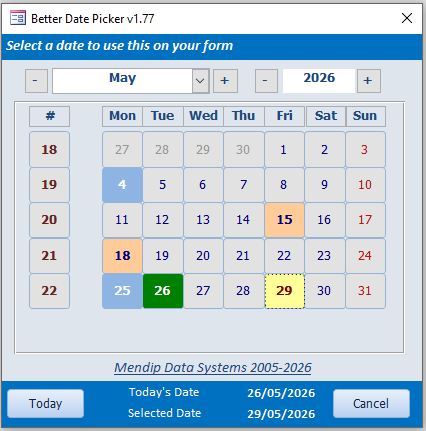
In this version, users can include public holidays and events in the date picker form as shown in this short (25s) video:
Key:
Blue background = public holiday
Pale orange background = user defined event
Yellow background = selected date
Green background = today
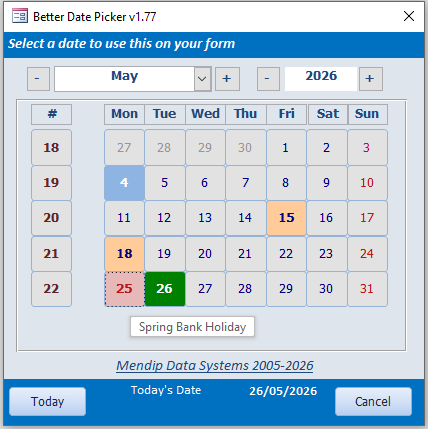
Each displays control-tip text on mouse hover over a highlighted date e.g. 25 May = Spring Bank Holiday.
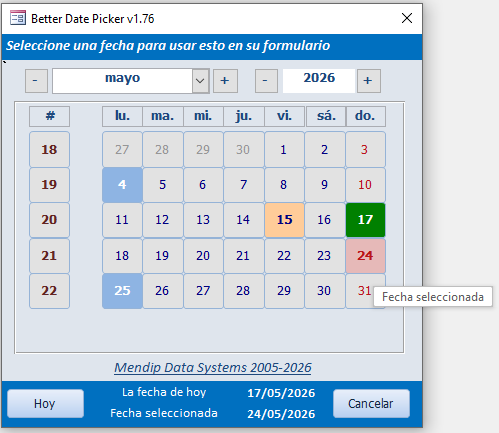
All items on the form are translated into the language used by Windows or Access.
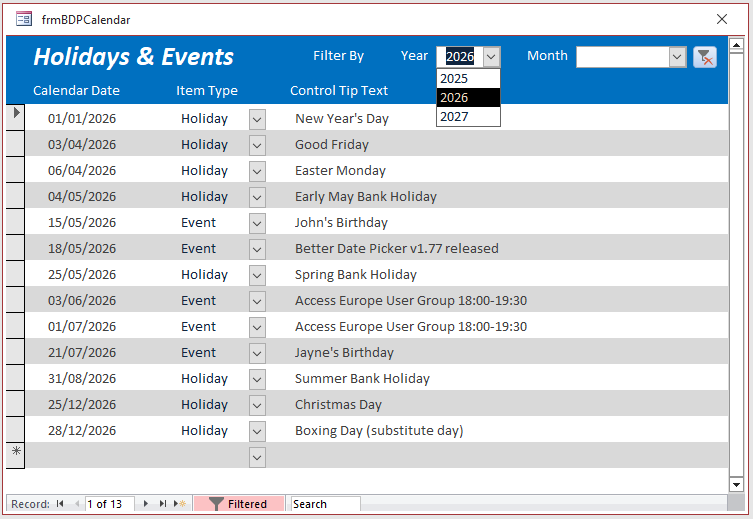
A separate form, frmBDPCalendar, is used to enter / edit this data which is stored in a user-defined system table, USysCalendar, together with the control tip text for each item.
Following a request in the forum thread, I added the option to display a date picker button as an icon instead of directly opening the date picker itself.
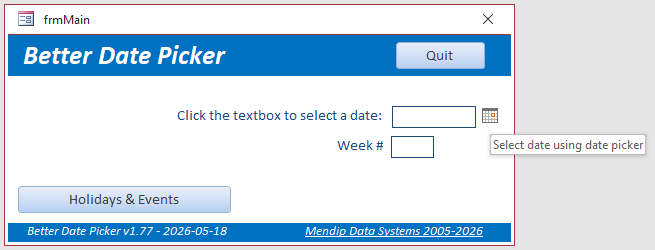
Showing the icon means users can directly enter the date in the textbox and bypass the date picker if preferred.
Code Changes
This new version is based on v1.72 but with the following code changes:
a) Additional colours defined in the declaration section of modDatePicker
'colour definitions: Colin RiddingtonPublic ConstColOrange= 10079487Public ConstColPaleYellow= 10092543'Public Const ColBlue = 6697728Public ConstColPaleBlue= 14922894Public ConstColDarkBlue= 8388608'Public Const ColBorder = 4210752Public ConstColLemon= 10092543Public ConstColDarkRed= 128Public ConstColMidRed= 1643706Public ConstColPaleGreen= 13434828Public ConstColDarkGreen= 32768Public ConstColPaleGrey= 14869218Public ConstColDarkGrey= 9868950'Public Const ColMidGrey = 11842740
b) Moved the code to start the date picker and process the output into a new procedure SetDatePicker (in the calling form)
Private SubSetDatePicker()DimstrTextAs StringIfGetInternetConnectedState= -1AndGetCurrentOfficeLangCode<> "en"ThenstrText=TranslateXL("Select a date to use this on your form", "en",GetCurrentOfficeLangCode())DoEventsInputDateField txtDate,strTextElseInputDateField txtDate, "Select a date to use this on your form"End IfDoEvents'v1.6 - disable next line if week number not needed on this formShowWeekNumbercmdExit.SetFocuscmdDatePicker.Visible=FalseEnd Sub
c) Added MouseMove events for all 42 date buttons on frmDatePicker - used to set focus to the button without clicking it, so the control tip text is displayed. For example:
'v1.77 - Mouse Move events to set focus on each date button so control tip text is displayedPrivate Subd00_MouseMove(ButtonAs Integer,ShiftAs Integer,XAs Single,YAs Single)d00.SetFocusEnd SubPrivate Subd01_MouseMove(ButtonAs Integer,ShiftAs Integer,XAs Single,YAs Single)d01.SetFocusEnd SubPrivate Subd02_MouseMove(ButtonAs Integer,ShiftAs Integer,XAs Single,YAs Single)d02.SetFocusEnd SubPrivate Subd03_MouseMove(ButtonAs Integer,ShiftAs Integer,XAs Single,YAs Single)d03.SetFocusEnd Sub
d) Added code to the DrawDateButtons procedure to format each of the highlighted dates and display the control tip text on mouseover
' This method draws the date buttons on the 7 x 6 grid.Private SubDrawDateButtons()'On Error GoTo Err_HandlerDimMonthDayOneAs Date,MonthDayLastAs Date,MonthLengthAs Integer,DayOfWeekAs IntegerDimIAs Integer,YAs Integer,XAs Integer,btnAsCommandButtonDimOutOfCurrentMonthAs BooleanDimOutOfDateAs DateDimintMaxWeekAs IntegerDimstrLangAs StringstrLang=GetCurrentOfficeLangCode()' first day of this month:MonthDayOne=DateSerial(myYear,myMonth, 1)' day of week on which the first of the month falls:DayOfWeek=DatePart("w",MonthDayOne,vbUseSystemDayOfWeek)' length of this month:MonthLength=DatePart("d",DateAdd("d", -1,DateAdd("m", 1,MonthDayOne)))' Initialize i to be what day of the month button (0, 0) will be on.'If the first of the month is Sun, start with i = 1.' If the first of the month is Mon or Tue, start with i = 0 or' i = -1, respectively.' y and x count the current row and column where we are on the grid.SetcmdCurrentDay=Nothing'set visibility of day buttons'all current month visible + days from previous / following month in same weeksI= 2 -DayOfWeekForY= 0To5ForX= 0To6Setbtn=Me.Controls("d"&Y&X)btn.ControlTipText= ""btn.Visible=True' If i falls within legal days for this month, show this button.If(I> 0)And(I<=MonthLength)ThenOutOfCurrentMonth=Falsebtn.Caption=Ibtn.Tag=I'get row value for final day of selected monthIfI=MonthLengthThenintMaxWeek=YElse'enable next line if out of month dates not required' btn.visible = False'code to enable dates from previous or following month'disable if feature not required'adapted from code suggested by Kitayama at Access World ForumsOutOfCurrentMonth=TrueOutOfDate=DateAdd("d",I- 1,DateSerial(Year(myDate),Month(myDate), 1))btn.Caption=Day(OutOfDate)btn.Tag=btn.CaptionIfI>MonthLengthAndY>intMaxWeekThenbtn.Visible=FalseEnd If'=================================================='v1.77 - UPDATED CODE to handle holidays / events and control tip text'format day colourIfI=Day(Date)AndtxtYear=Year(Date)AndcboMonth=Month(Date)Then'todaybtn.ControlTipText= "Today's Date"btn.BackColor=ColDarkGreenbtn.ForeColor=vbWhitebtn.FontWeight= 600btn.ControlTipText=Space(2) &TranslateXL("Today's Date", "en",strLang) &Space(2)ElseIfI=SelectedDayAndtxtYear=SelectedYearAndcboMonth=SelectedMonthThen'selected dateSetcmdCurrentDay=btnbtn.BackColor=ColLemonbtn.ForeColor=ColDarkRedbtn.FontWeight= 600' btn.FontSize = intFontSize + 2btn.ControlTipText=Space(2) &TranslateXL("Selected Date", "en",strLang) &Space(2)ElseIfX= 6Then'Sundaybtn.ForeColor=ColMidRedElseIfDCount("*", "qryCalMonthYear", "ItemType = 'Holiday' And CalDay ="&I) > 0Then'holiday date v1.77btn.BackColor=ColPaleBluebtn.ForeColor=vbWhitebtn.FontWeight= 600btn.ControlTipText=Space(2) &DLookup("TipText", "qryCalMonthYear", "ItemType = 'Holiday' And CalDay = "&I) &Space(2)ElseIfDCount("*", "qryCalMonthYear", "ItemType = 'Event' And CalDay ="&I) > 0Then'event date v1.77btn.BackColor=ColOrangebtn.ForeColor=ColDarkBluebtn.FontWeight= 600btn.ControlTipText=Space(2) &DLookup("TipText", "qryCalMonthYear", "ItemType = 'Event' And CalDay ="&I) &Space(2)Else'other datesbtn.BackColor=ColPaleGrey'currently selected month in bluebtn.ForeColor=ColDarkBluebtn.FontWeight= 400btn.FontSize=intFontSize' btn.ControlTipText = "Click to select date"'previous/following month in dark grey'disable if out of month dates not requiredIfOutOfCurrentMonthThenbtn.ForeColor=ColDarkGreyEnd If'==================================================' Advance to next day.I=I+ 1NextNextExit_Handler:Exit SubErr_Handler:MsgBox"Error "&Err.Number& " in DrawDateButtons procedure : "&Err.DescriptionResumeExit_HandlerEnd Sub
Using the Better Date Picker in your own apps
If you want to use ALL the available features, import ALL objects except frmMain into your own database.
Tables: tblMsoLang / USysCalendar
Query: qryCalMonthYear
Macro: Autoexec
Forms: frmDatePicker, frmBDPCalendar
Modules: modDatePicker, modLocale, modResizeForm, modTranslate
NOTE:
The USysCalendar table is a user defined system table and is normally hidden in the navigation pane. Tick Show System Tables in Navigation Options to make this table visible.
Customising the Better Date Picker
By default, clicking on a date textbox opens the date picker using the SetDatePicker procedure.
If you prefer to show the date picker icon next to the date textbox on your calling form, modify the code as shown below:
Private SubcmdDatePicker_Click()'Following code only used if button set visible when txtDate is clicked' SetDatePickerEnd SubPrivate SubtxtDate_Click()'v1.77 OPTIONAL - show date picker icon when clicked' cmdDatePicker.Visible = True'If previous line enabled, comment out line below and enable same code in cmdDatePicker_Click eventSetDatePickerEnd Sub
If you do not need certain features, make the following changes:
a) Remove Week Numbers
Disable the line ShowWeekNumber in the SetDatePicker procedure
b) Remove Automatic Form Resizing
Disable or delete the line ResizeForm Me in the Form_Load event of frmDatePicker and do not import module modResizeForm
c) Remove Translation features
If you only need English captions, use version 1.77_En instead. All translation related code and objects have been removed from this version.
Downloads
Click to download:
Better Date Picker v1.77 ACCDB file Approx 1 MB (zipped) INCLUDES translation code
Better Date Picker v1.77 En ACCDB file Approx 1 MB (zipped) English ONLY - no translation code
As is the case for all files downloaded from the internet, first unblock the downloaded file, unzip then save to a trusted location.
For more details, see my article:
Unblock downloaded files by removing the Mark of the Web
Feedback
Please use the E-Mail button in the contact form below to let me know whether you found this article useful or if you have any questions.
Please also consider making a donation towards the costs of maintaining this website. Thank you.
| Colin Riddington | Mendip Data Systems | Last Updated 26 May 2026 |
|---|
|
Return to Example Databases Page
|
Return to Top
|