First Published 6 Nov 2025 Last Updated 7 Nov 2025
Whilst Task Manager allows you to determine which applications are running in the background, sometimes it can be useful to use VBA code to check whether another specified application is running. This can easily be done using Windows Machine Instrumentation (WMI)
CODE:
Public FunctionCheckProcess(ProcessNameAs String)As Integer'Count number of instances of named process ProcessNameDimstrComputerAs StringDimcolProcessesDimobjWMIService'Use this computer to see processes onstrComputer= "."'Impersonate this computerSetobjWMIService=GetObject("winmgmts:{impersonationLevel=impersonate}!\\"&strComputer& "\root\cimv2")'Get all running processes with this ProcessNameSetcolProcesses=objWMIService.ExecQuery("SELECT * FROM Win32_Process WHERE Name = '"&ProcessName& "'")CheckProcess=colProcesses.Count' Debug.Print CheckProcessEnd Function
If CheckProcess > 0 for the specified process, then that application is running.
For example, to check whether Excel is also running, use CheckProcess ("Excel.exe") and see if CheckProcess > 0.
To detect whether another instance of Access is running apart from the 'host' database, use CheckProcess ("MSAccess.exe") and check whether CheckProcess > 1.
This could be done when the application is first opened but doing that wouldn't detect when the specified app was opened subsequently.
As an alternative, use a Timer event on a hidden and always-open form to run a check at specified intervals e.g. every 5 seconds.
If a specified process is running, then you may wish to do one of the following:
a) Show a warning message and ask whether the selected app should be closed
b) Forcibly close the external app e.g. using taskkill, EndTask API, GetProcess API or a similar approach. See my article: Forcibly Shutdown Access
The same methods can be used for any other process such as Word, Excel etc.
For example using taskkill from a command prompt: cmd /c taskkill /F /IM "Excel.exe"

Similar code can be used within Access using the Shell command on e.g. a button click event procedure - in this case to 'kill' all instances of Notepad:
Private SubcmdKillProcess_Click()Shell"cmd /c taskkill /F /IM Notepad.exe"End Sub
NOTE: Forcibly closing running apps can lead to loss of data and possible corruption. This approach should be treated as a last resort.
c) An alternative approach combines both the above steps and was based on a suggestion by my Spanish colleague Xevi Batlle.
The modified code both checks and kills all instances of a specified process (except for the current process)
Private Declare PtrSafe FunctionGetCurrentProcessIdLib"kernel32"()As LongPublic FunctionKillProcesses(ProcessNameAs String)As Boolean'Kill all instances of named process ProcessName (except for the current process)DimiCountAs IntegerDimstrComputerAs StringDimcolProcessesDimobjWMIServiceDimprocess'Use this computer to see processes onstrComputer= "."'Impersonate this computerSetobjWMIService=GetObject("winmgmts:{impersonationLevel=impersonate}!\\"&strComputer& "\root\cimv2")'Get all running processes with the specified ProcessName (except the current process if checking MsAccess.exe)SetcolProcesses=objWMIService.ExecQuery("SELECT *"& _" FROM Win32_Process "& _" WHERE Name = '"&ProcessName& "'"& _" AND ProcessID <> "&GetCurrentProcessId& "")'count instances of named processiCount=colProcesses.Count'Kill all instancesFor EachprocessIncolProcessesKillProcesses=Trueprocess.TerminateNext'OPTIONAL - show messageSelect CaseiCountCase Is> 1MsgBox iCount& " instances of "&ProcessName& " have been terminated",vbInformation, "KillProcesses"Case1MsgBox iCount& " instance of "&ProcessName& " has been terminated",vbInformation, "KillProcesses"Case0IfProcessName= "MsAccess.exe"ThenMsgBox"There were no other running instances of "&ProcessName,vbInformation, "KillProcesses"ElseMsgBox"There were no running instances of "&ProcessName,vbInformation, "KillProcesses"End IfEnd SelectEnd Function
d) Save and quit the current Access application without losing any data.
The following code checks for Excel, PowerShell and other Access instances. If any are found, the Access app is closed automatically.
Example Code:
Private SubForm_Timer()On Error GoToErr_Handler'check for other instances of VBA / scripting enabled applications'other Access appsIfCheckProcess("MSAccess.exe") > 1Then GoToPrepareShutdown'check if Excel in useIfCheckProcess("Excel.exe") > 0Then GoToPrepareShutdown'check if PowerShell ISE in useIfCheckProcess("powershell_ise.exe") > 0Then GoToPrepareShutdownGoToExit_HandlerPrepareShutdown:DoCmd.Close acForm,Me.Name,acSaveYesApplication.QuitExit_Handler:Exit SubErr_Handler:MsgBox"Error "&Err.Number& " in Form_Timer procedure : "&vbCrLf&Err.DescriptionResumeExit_HandlerEnd Sub
Code similar to that above is used in my Encrypted Split No Strings example database.
However, in that example app, the code checks for a much wider range of running processes as one part of a number of security measures to prevent external automation being used.
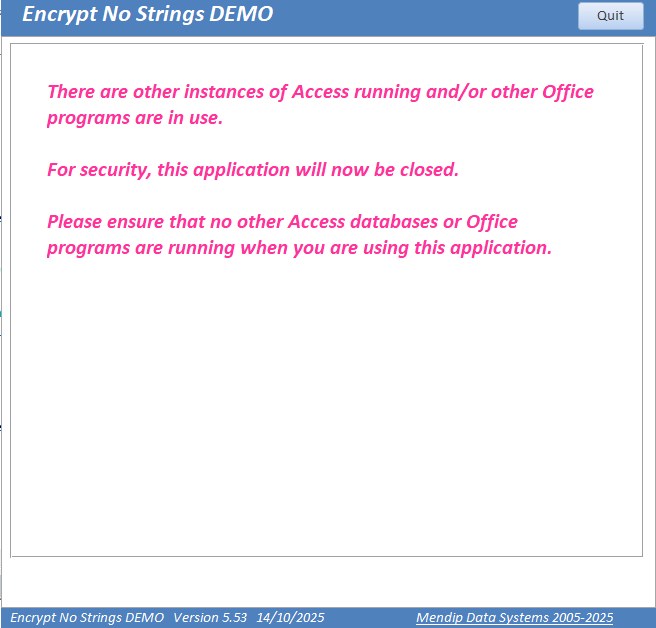
Providing it is used with care, code such as CheckProcess (and similar variants) can be employed in a variety of situations to enhance security without risk of data loss.

Feedback
Please use the contact form below to let me know whether you found this article interesting/useful or if you have any questions/comments.
Please also consider making a donation towards the costs of maintaining this website. Thank you
Colin Riddington Mendip Data Systems Last Updated 7 Nov 2025
|
Return to Code Samples Page
|
Return to Top
|