Last Updated 31 Jan 2022
As is widely known Excel has a very useful autofill feature.
Less well known is the Access 'equivalent' which allows you to copy the value from the same field in the previous record to the current record
To do so, use the keyboard shortcut Ctrl+' (apostrophe)
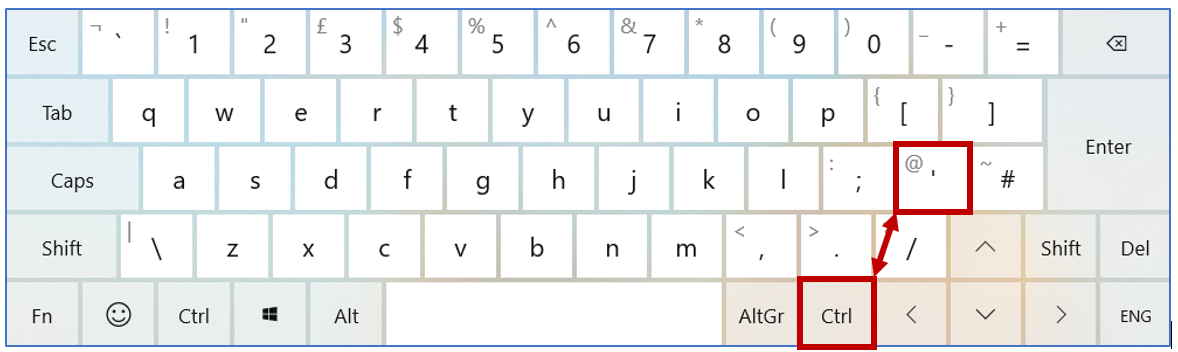
This works both to fill an empty field or to replace an existing value. It works in tables, queries & continuous / datasheet forms
Of course you can also do this using copy & paste but that needs more clicks ...
A complete(?) list of keyboard shortcuts can be found here:
Keyboard Shortcuts for Access
UPDATE 11 Nov 2019:
You may be interested in an example application by APR Pillai (Learn MS Access Tips & Tricks website).
He uses the Tag property to duplicate the contents of several fields at once:
Duplicate Multiple Fields in a record to the next record with conditional formatting
UPDATE 31 Jan 2022:
This tip is included in my Fill Down in Access video on YouTube comparing the fill down feature in Excel with various options for 'copying data' from the previous record in Access.
Three methods are discussed:
- use of field default values
- use keyboard shortcut Ctrl + ' (apostrophe) to copy individual fields
- VBA code to allow copying of multiple fields
The video is available at: https://www.youtu.be/0flXZ1f_ueg or you can click on the video below

Download
Click to download the example app shown in the video: FillDown
Feedback
Please use the E-Mail button in the contact form below to let me know whether you found this article / example app useful or if you have any questions.
Also do contact me if you have any suggestions for additional features.
Please also consider making a donation towards the costs of maintaining this website. Thank you
Colin Riddington Mendip Data Systems Last Updated 31 Jan 2022
Return to Example Databases Page
Return to Top
Code Samples for Businesses, Schools & Developers