| Version 1.5 | First Published 14 May 2026 |
|---|

This first part of this article discussed solutions to a problem raised by a former Access MVP about moving all the components of an option group together as a group.
Despite the control name, the components of an option group behave independently in form view. They do not automatically move together with the container.
By contrast, in both design view and layout view, Access 'helpfully' manages the option group components so they do move as a group when the container frame is selected!
This issue does NOT affect other controls made up of several components such as subforms and tab controls.
The first article included two sets of code to move all the option group components together as a group:
• Use the same tag property for each control in the option group and loop through all the controls in turn identifying which should be moved (see Form 3)
• Use code to identify all the option group controls and loop through these in the same way (see Form 4)
The code in both Form3 and Form4 works perfectly for small OFFSET values such as 200 twips (approx 0.35 cm) whether the option group controls are arranged vertically or horizontally
However, for larger OFFSET values such as 800 twips (approx 1.4cm), both sets of code will give incorrect results.
The option group height will increase and, in the case of Form4, the option buttons and labels become misaligned.
| Form4 at start | Form4: Offset = 800px after up & down clicks |
|---|---|
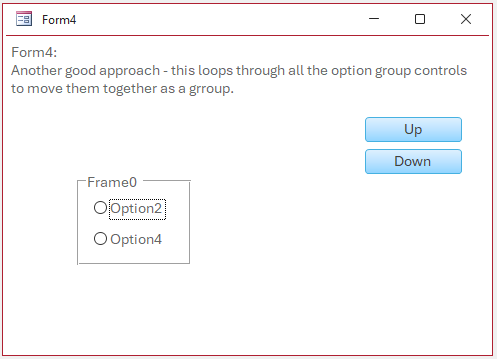 |
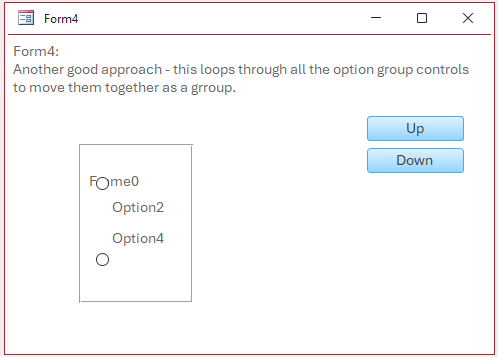 |
The same problems occur for both vertically and horizontally aligned option controls at large offsets.
There are two reasons for these issues:
• If the offset value is too large the components could try to move outside the frame which is prohibited.
For example on clicking the Up button, the position of the lower option group button may constrain the bottom frame position but the code forces the top position to move up.
Similar issues occur on clicking the Down button.
• Controls in an option group are referenced from top to bottom.
If you change the top property value by a large offset, the control order may be altered and prevent the looping code working correctly.
In this article, I will provide modified code that overcomes both problems and so also works correctly with large offsets.
Form3A - modified Tag property loop code
In the revised code, the option frame is handled separately to the group controls.
a) When the Up button is clicked, the frame height is first increased (temporarily) by the offset value to make space for all moved controls.
b) The top of the option frame is now moved up to make space for when the controls are moved.
c) Next the code loops through and moves all the group controls (identified by the Tag property = "OG") up.
d) Finally, the option frame height is again reduced by the offset value to restore its original height
When the Down button is clicked, the sequence is similar but the top of the option frame must be moved down AFTER looping through to shift all the group controls down.
DimctrlAsControlConstOFFSETAs Long= 800'Form3A:'This modified code uses the Tag property to loop through the option group'controls to move them as a group. The option frame is treated separately'Also works for larger offset values e.g. 800Private Subcmd_Down_Click()If Me.Frame0.Top+Me.Frame0.Height< 4 * 1440ThenMe.Frame0.Height=Me.Frame0.Height+OFFSET'Increase the frame height before moving the controlsFor EachctrlIn Me.ControlsIfctrl.Tag= "OG"Thenctrl.Top=ctrl.Top+OFFSET'Move the controls downNextMe.Frame0.Top=Me.Frame0.Top+OFFSET'Move the option frame down after moving the controlsMe.Frame0.Height=Me.Frame0.Height-OFFSET'Restore the original frame height after moving the controls.End IfEnd SubPrivate Subcmd_Up_Click()If Me.Frame0.Top>OFFSETThenMe.Frame0.Height=Me.Frame0.Height+OFFSET'Increase the frame height before moving the controlsMe.Frame0.Top=Me.Frame0.Top-OFFSET'Move the option frame up before moving the controlsFor EachctrlIn Me.ControlsIfctrl.Tag= "OG"Thenctrl.Top=ctrl.Top-OFFSET'Move the controls upNextMe.Frame0.Height=Me.Frame0.Height-OFFSET'Restore the original frame height after moving the controls.End IfEnd Sub
Form3B has horizontally aligned option group controls with exactly the same code used as for form3A.
However, the code will NOT work as written where multiple option groups are used as only one frame is referenced in the code.
Using the Tag property is perhaps slightly simpler if you only need to move one option group. However where multiple option groups are involved, use the alternative code in Form4A.
Form4A - modified option group loop code
In the revised code, the option frame is again handled separately to the group controls and uses the same sequence as for Form3A
a) When the Up button is clicked, the frame height is first increased (temporarily) by the offset value to make space for all moved controls.
b) the top of the option frame can now be safely moved up.
c) Next the code loops through and moves all the group controls up.
d) Finally, the option frame height is again reduced by the offset value to restore its original height
When the Down button is clicked, the sequence is again similar but the controls are looped through in reverse order starting with the last (bottom) control.
Also the top of the option frame is moved down AFTER looping through to move all the controls down.
Private ConstOFFSETAs Long= 800'Form4A:'Modified code by Xevi Batlle which loops through all the'option group controls to move them as a group.'Also works for larger offset values e.g. 800Private Subcmd_Down_Click()DimIAs LongIf Me.Frame0.Top+Me.Frame0.Height< 4 * 1440ThenForI=Me.Controls.Count- 1To0Step-1If Me.Controls(I).ControlType=acOptionGroupThenMe.Controls(I).Height=Me.Controls(I).Height+OFFSET'Increase the frame height before moving the controlsCallListOptionGroupContents(Me.Controls(I),OFFSET)'Move the controls downMe.Controls(I).Top=Me.Controls(I).Top+OFFSET'Move the option frame down after moving the controlsMe.Controls(I).Height=Me.Controls(I).Height-OFFSET'Restore the original frame height after moving the controls.End IfNextEnd IfEnd SubPrivate Subcmd_Up_Click()DimctrlAsControlIf Me.Frame0.Top>OFFSETThenFor EachctrlIn Me.ControlsIfctrl.ControlType=acOptionGroupThenctrl.Height=ctrl.Height+OFFSET'Increase the frame height before moving the controlsctrl.Top=ctrl.Top-OFFSET'Move the option frame up before moving the controlsCallListOptionGroupContents(ctrl, -OFFSET)'Move the controls upctrl.Height=ctrl.Height-OFFSET'Restore the original frame height after moving the controls.End IfNextEnd IfEnd SubSubListOptionGroupContents(optGroupAsControl,local_OFFSETAs Long)DimctlAsControlDimIAs Long' The controls in a group of options are numbered from top to bottom according to their position on the screen,' so if you change the "Top" property, controls might be renumbered and may not display correctly when you loop through them.' Loop through each control inside the option group' When local_OFFSET is negative this procedure list loop all the controls from top to bottomIflocal_OFFSET< 0ThenFor EachctlInoptGroup.Controlsctl.Top=ctl.Top+local_OFFSETNextctlElse' When local_OFFSET is positive this procedure list loop all the controls from bottom to top' Loop from last control to first controlForI=optGroup.Controls.Count- 1To0Step-1Setctl=optGroup.Controls(I)ctl.Top=ctl.Top+local_OFFSETNextIEnd IfSetctl=NothingEnd Sub
More forms:
Form4B has horizontally aligned option group controls with exactly the same code used as for Form4A.
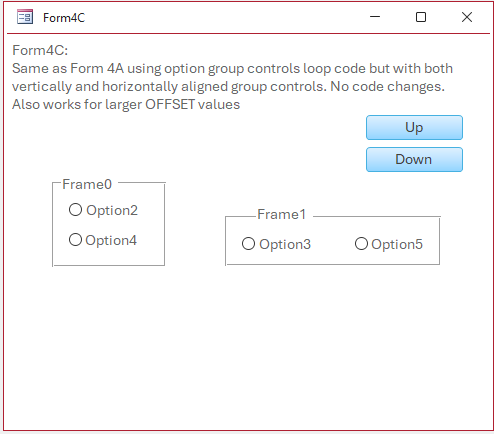
Form4C has two option groups with both vertically and horizontally aligned controls. This also works with no code changes required.
| Form4A | Form4B | Form4C |
|---|---|---|
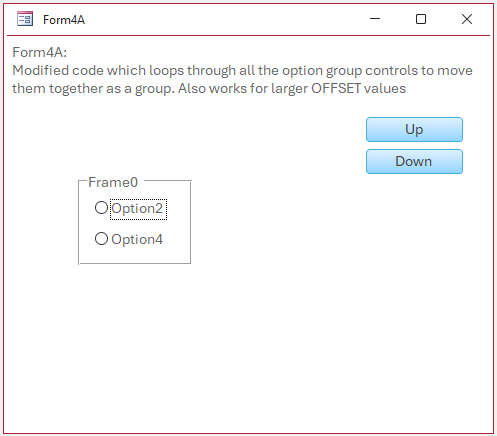 |
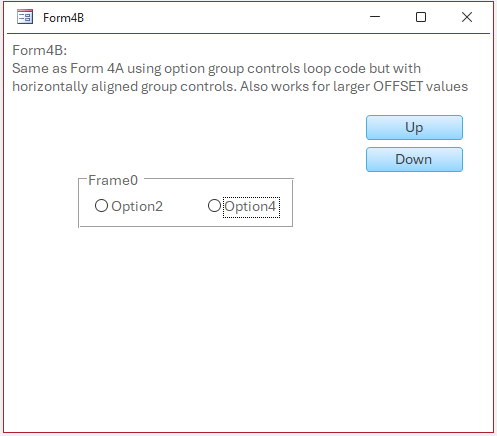 |
 |
This approach is definitely much easier to work with if you need to move more than one option group at the same time.
Download
Click to download the example app used in this article:
Option Group Move v1.5 ACCDB file - Approx 0.6 MB (zipped)
As is the case for all files downloaded from the internet, first unblock the downloaded file, unzip then save to a trusted location.
For more details, see my article:
Unblock downloaded files by removing the Mark of the Web
Acknowledgements
Many thanks to:
• Shane Groff - for confirming the behaviour of the option group control as being by design (not a bug)
• Xevi Batlle - for suggesting the approach used in Form4. Also for bug testing earlier versions of the example app.
Feedback
Please use the E-Mail button in the contact form below to let me know whether you found this article useful or if you have any questions.
Please also consider making a donation towards the costs of maintaining this website. Thank you
Colin Riddington
Mendip Data Systems
Last Updated 14 May 2026
Return to Code Samples Page
Page 2 of 2
Page 1
Page 2
Return To Top