Updated 8 Dec 2018
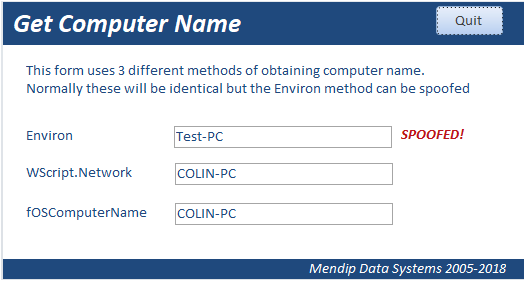
There are 3 common methods of getting the current computer name in Access
1. Environ("ComputerName")
2. CreateObject("WScript.Network").ComputerName
3. fOSComputerName function by Dev Ashish
As this includes API declarations, it needs to be adapted for 32-bit/64-bit systems using conditional compilation
CODE:
#If VBA7 Then
Private Declare PtrSafe Function apiGetComputerName Lib "kernel32" Alias _
"GetComputerNameA" (ByVal lpBuffer As String, nSize As Long) As Long
#Else
Private Declare Function apiGetComputerName Lib "kernel32" Alias _
"GetComputerNameA" (ByVal lpBuffer As String, nSize As Long) As Long
#End If
'=================================================
Function fOSComputerName() As String
'Returns the computername
Dim lngLen As Long, lngX As Long
Dim strCompName As String
lngLen = 16
strCompName = String$(lngLen, 0)
lngX = apiGetComputerName(strCompName, lngLen)
If lngX <> 0 Then
fOSComputerName = Left$(strCompName, lngLen)
Else
fOSComputerName = ""
End If
End Function
Of the 3 methods, the simplest uses the Environ function.
However it is possible to 'spoof' some Environ variables including the computer name so this method can not be guaranteed to be accurate
This is the case for both ACCDB & ACCDE files
NOTE:
I am deliberately not going to explain here how this can be done.
As far as I am aware, the other two methods cannot be 'spoofed'.
Therefore, where it is important that the information isn't falsified, use one of methods 2 or 3.
As the WScript method does not need adapting for 32-bit/64-bit systems, that is the approach I would normally recommend.

Download
Click to download an example database:
GetComputerName Approx 0.4 MB (zipped)
NOTE:
This is a companion to my GetUserName article.
Feedback
Please use the E-Mail button in the contact form below to let me know whether you found this article useful or if you have any questions.
Please also consider making a donation towards the costs of maintaining this website. Thank you
Colin Riddington Mendip Data Systems Last Updated 8 Dec 2018
|
Return to Code Samples Page
|
Return to Top
|