
| First Published 27 Apr 2025 | Last Updated 27 Mar 2026 | Difficulty level : Easy |
|---|
Section Links (on this page):
Introduction
Status Updates
Partial execution of query SQL
Pretty formatting of SQL
Speedy loading
Video
Feedback
| 1. Introduction | Return To Top |
|---|
This is the third in a series of articles about the Monaco SQL Editor which rolled out to Access 365 current channel with version 2410 build 18129.20116 released on 28 October 2024.
Many improvements have been made since the initial launch.
The first article in this series describes the main features of the new editor and shows how these are a significant improvement over the old legacy SQL editor.
By default, Monaco is enabled in all existing and new databases that are trusted. It is not currently possible to disable Monaco globally for all databases.
As with any major new feature, a number of issues have been reported. It would be reasonable to suggest Monaco has had more issues than most features though these are mostly now fixed.
The second article in the series provides a detailed and ongoing list of the main changes, known issues and bug fixes.
This third article describes three major improvements that were added to the Monaco editor several months after the initial launch. These are:
1. Partial execution of query SQL
2. Expanded (pretty) formatting
3. Much faster load time (speedy loading)
Each of these items were first announced at the recent Access DevCon conference on 10 April 2025 - see Video section below.
The fourth article in this series explains how the new speedy loading feature works.
The official Microsoft documentation is available at: Use the Monaco SQL query editor - Microsoft Support
| 2. Status Updates | Return To Top |
|---|
| Date | Details |
|---|---|
| 2025-05-31 | The first two improvements were included in the Beta channel version 2506 build 18925.20000 released on 28 May 2025. The third item is undergoing further testing. |
| 2025-07-09 | The first two improvements were released to the Current channel with version 2506 build 18925.20138 released on 1 July 2025. The third item is now available to all users in the Beta channel. |
| 2025-08-30 | The third item (speedy loading) is also now available to some users in the Current Channel starting wth version 2508 build 19127.20154 released on 26 Aug 2025. |
| 2025-11-01 | The speedy loading feature has been deliberately rolled out very gradually over the past two months. According to the Access team, it has now been rolled out to 50% of the users in the Current Channel. |
| 2025-11-12 | Speedy loading disabled again in the Current Channel as it caused issues with Advanced Filter / Sort. |
| 2026-01-14 | A new approach to speedy loading using a top level domain was released to the Beta Channel with version 2602. It will roll out to all channels in the coming months. |
| 2026-03-12 | Pretty formatting can now be enabled/disabled for individual queries rather than applying it globally to the entire database. This is done through the query object properties or in code. Available in beta version 2604 19902.20000 (2026-03-06). |
| 2026-03-27 | Ctr+K is now a toggle. Pretty formatting can now also be enabled/disabled for individual queries 'on the fly' using the Ctrl+K keyobard shortcut. Available in beta version 2604 19923.20000 (2026-03-26). |
| 3. Partial execution of query SQL | Return To Top |
|---|
Released to Beta channel version 2506 build 18925.20000 (28 May 2025)
Until now it has only been possible to run / execute the entire query SQL. For example, it was not possible to see the results of each clause in a union query separately.
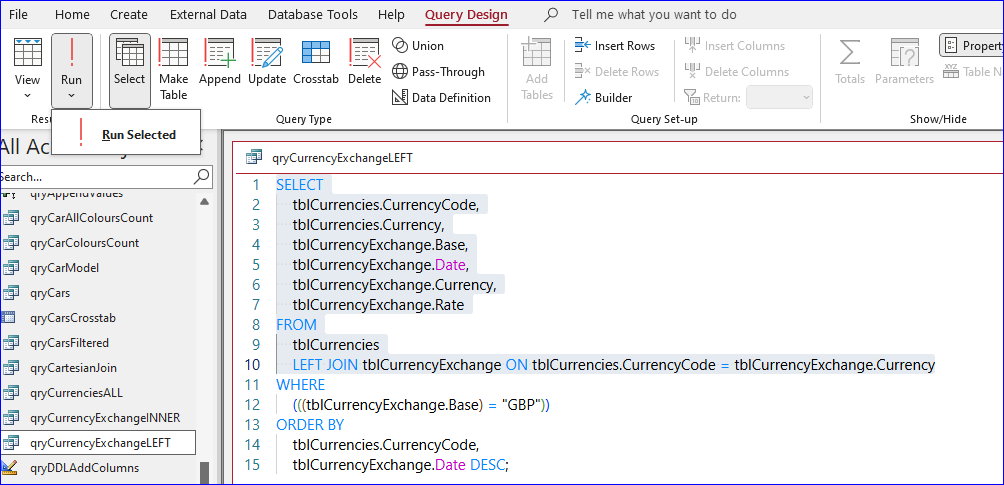
This change allows users to highlight part of a query and then press a new dropdown Run Selected to see the results for the highlighted SQL only.
The result is similar to the existing functionality in SQL Server Management Studio (SSMS)
In the screenshot below, only the SELECT and FROM clauses have been selected, omitting the WHERE and ORDER BY sections.
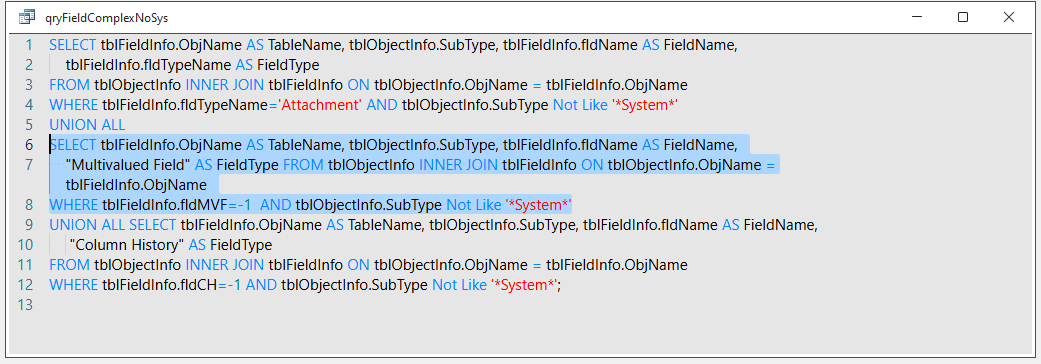
This works for any contiguous SQL that is valid on its own. For example the second UNION clause in a query:
If the highlighted SQL is not valid on its own, an error message will appear e.g. Syntax error in FROM clause
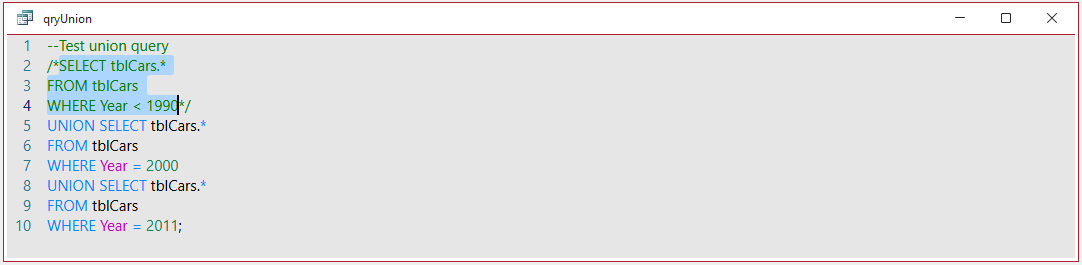
Partial query execution can also be done on commented sections of SQL.
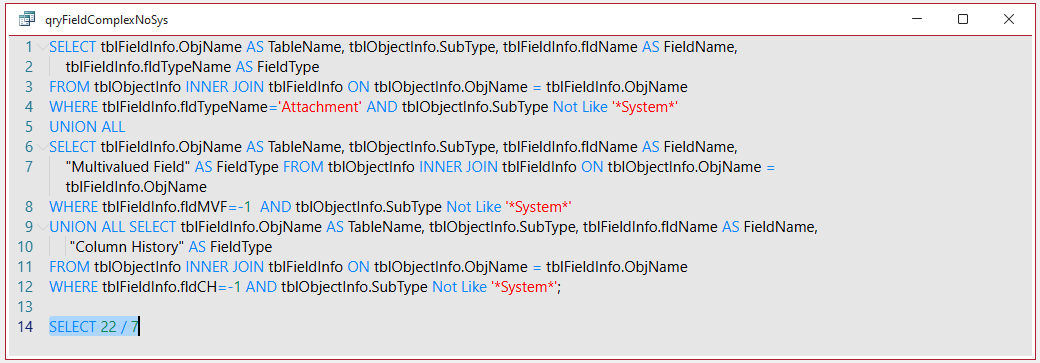
Users can also now type temporary SQL and test that on the fly. For example, a calculation for Pi using SELECT 22/7;
NOTE: An error message will appear if Run Selected is clicked when Monaco is disabled:
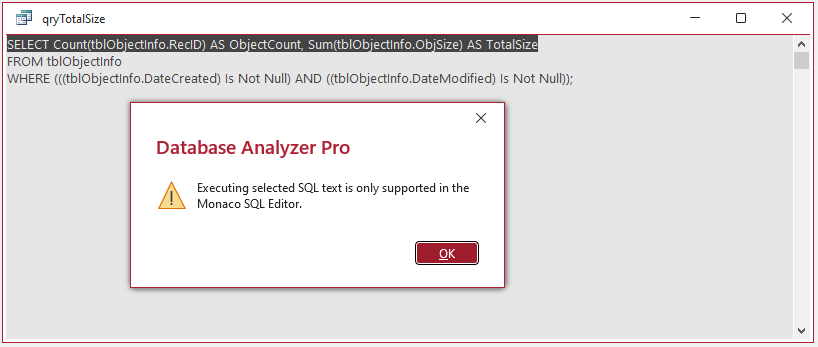
UPDATE 9 July 2025:
Problems can occur if the Run Selected button is clicked when no SQL is selected e.g. due to user error. For example:
• Create a new query in design view and click Run Selected. Change to SQL view - the Monaco window is empty!
Change back to design or datasheet view then SQL view again - SQL is restored.
• Create a new query in SQL view and click Run Selected. Nothing happens as no SQL is selected.
Change to design view. Both the table and field areas are empty. Toggle between design & SQL view a few times. At some point all the SQL will also disappear apart from SELECT;
As a simple fix, I have requested that Run Selected be disabled by default and only enabled whilst some SQL is actually selected in the Monaco window.
UPDATE 28 Aug 2025:
All the above issues have now been fixed in the Current Channel and Insider channels
4. Pretty formatting of SQL
Return To Top
Released to Beta channel version 2506 build 18925.20000 (28 May 2025)
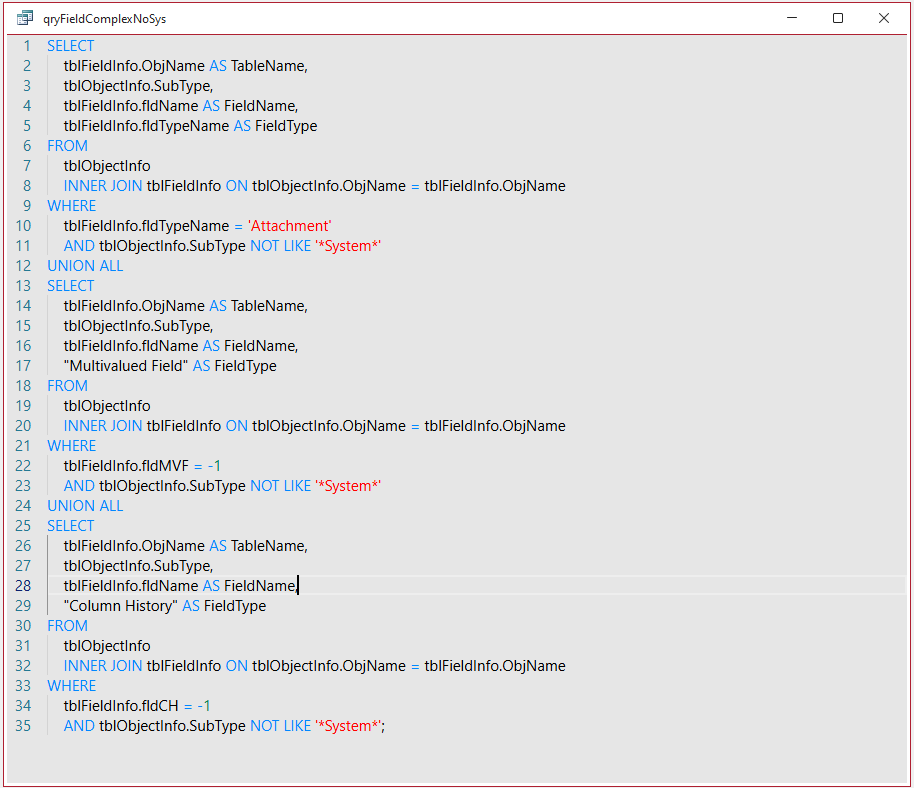
The Monaco editor always allowed users to manually format SQL but the results were usually not retained when the query is closed.
The new formatting feature automatically expands and autoformats SQL when viewed in the Monaco editor. For example:
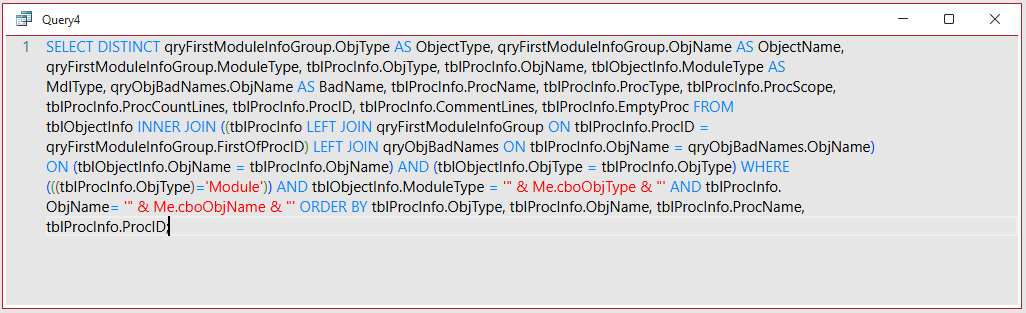
If the formatting is manually removed or unformatted SQL is pasted into the Monaco window, a new shortcut key (Ctrl+K) will instantly change unformatted SQL such as this . . .
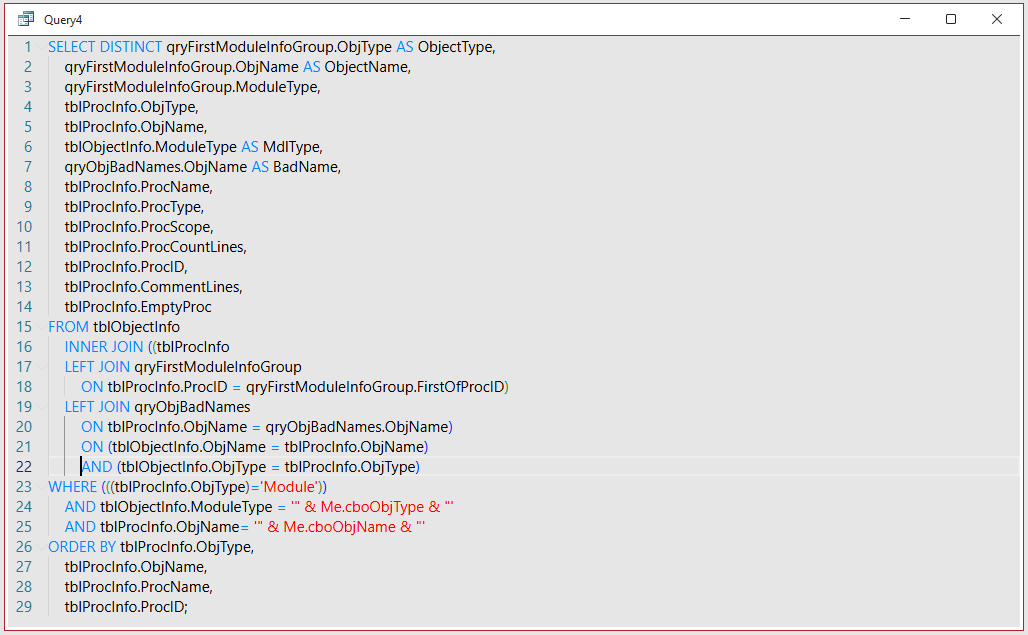
. . . to expanded and formatted SQL.
The new formatting capability was achieved using the open source sql-formatting library.
UPDATE 9 July 2025:
When a subquery is used in the WHERE clause, the new expanded SQL formatting is retained when changed to design view.
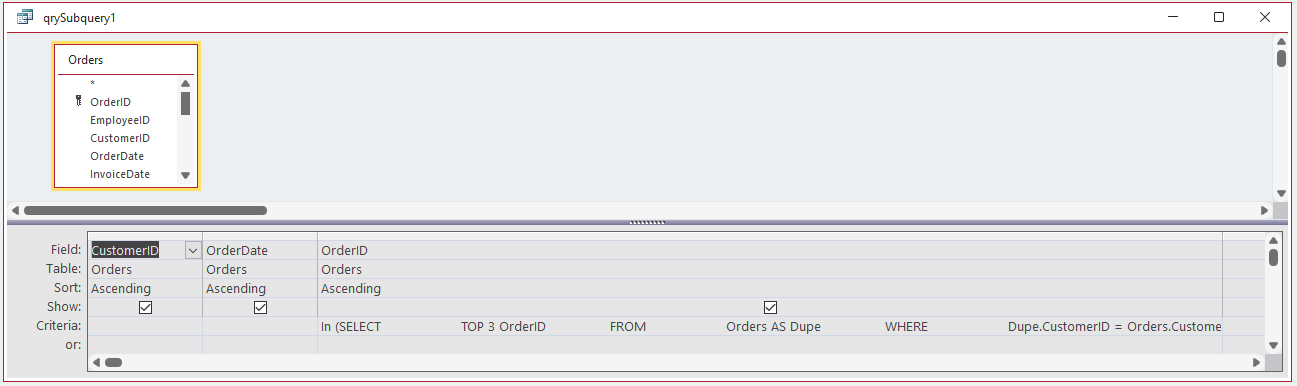
In certain extreme cases, this may cause the 1024 character limit for query fields to be exceeded
The issue will be addressed by the Access team. Additional spaces will no longer occur in design view.
UPDATE 12 Mar 2026:
Following many requests, pretty formatting can now be enabled/disabled for individual queries rather than applying it globally to the entire database.
This was first made available in beta version 2604 19902.20000 (released 2026-03-06) and will roll out to all channels in the coming months.
To disable pretty formatting, tick the the new No Format checkbox in the query object properties.
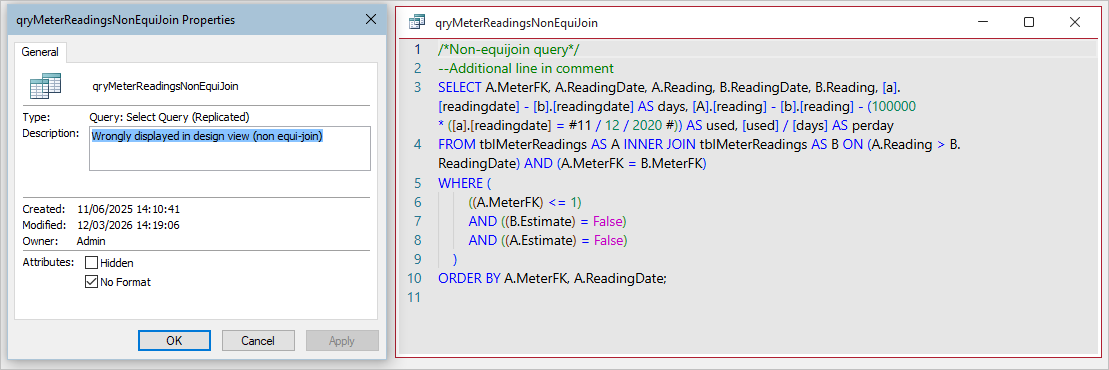
Untick the checkbox to re-enable the feature for that query.
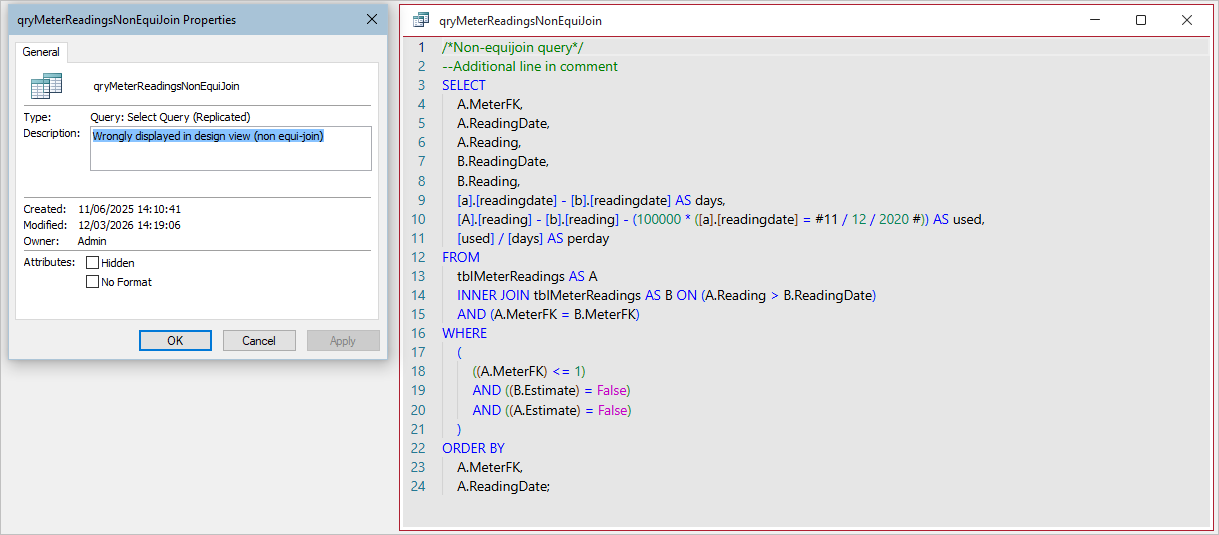
These changes can also be done using code. For example, to disable pretty formatting for Query1:
CurrentDb.QueryDefs("Query1").Properties("NoFormat") = True
NOTE:
The shortcut Ctrl+K can still be used to apply pretty formatting even if disabled in the object properties or using VBA.
If you do this, you will see the usual "Do you want to save changes . . . " dialog when you close the query.
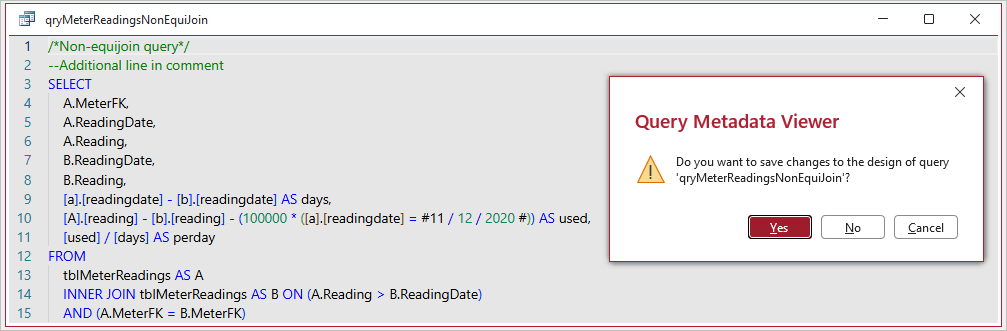
Click Yes if you want to disable the NoFormat property again for this query. Otherwise click No.
UPDATE 27 Mar 2026 (BETA Channel version 2604 19223.20000)
I am very pleased to see that my request for the Ctrl+K shortcut to become a toggle has now also been implemented.
This means you can now use the shortcut to enable / disable pretty formatting 'on the fly' independently of the new No Format property value. PERFECT!!!
| 5. Much faster loading time (AKA speedy loading) | Return To Top |
|---|
Released to the Beta Channel with version 2507 in July 2025 and to Current Channel (Preview) with version 2508 in August 2025.
This is also now available to some Current channel users from version 2508 build 19127.20154 (26 Aug 2025) and will gradually roll out to all users following further tests.
Until now, for most users, the Monaco editor took about 3 seconds to load for each query with the first query sometimes taking longer than this.
The delay was due to issues with the Edge browser control when accessing local HTML pages as required by Monaco.
By comparison, changing back to Monaco from design or datasheet view wass instantaneous as Monaco has already been loaded.
As a workaround, the Monaco editor is now preloaded during idle loop time when an Access app is first loaded.
As a result, the Monaco editor window appears to load almost instantly for each query. The short video below (33s) has no audio.
UPDATE 23 July 2025
Several WebView2 processes are now loaded with Access to manage the preloading of Monaco and support speedy loading.
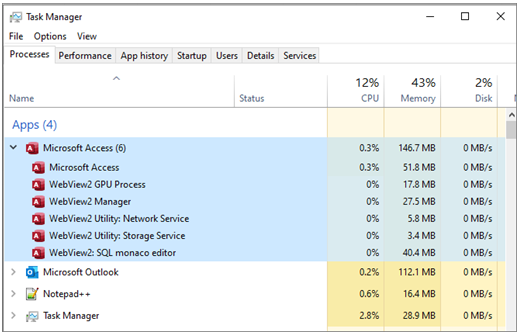
Additional WebView2 SQL monaco editor items are added as more queries are opened in SQL view and removed when closed.
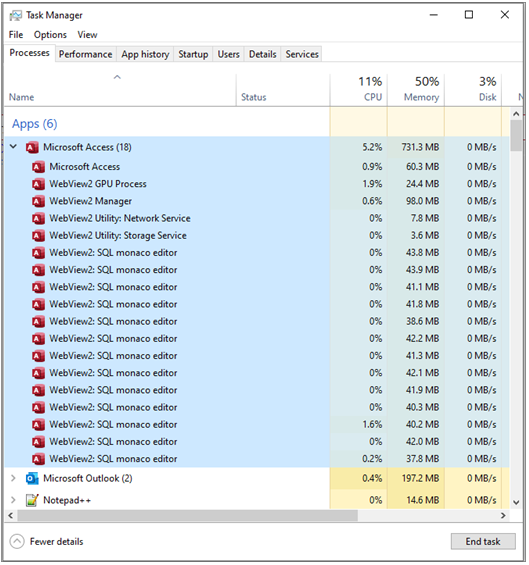
If several open queries are closed simultaneously using Close All, ALL the additional WebView2 SQL monaco editor items are also removed.
For more details, see the fourth article in this series: How Speedy Loading Works in the Monaco SQL Editor
| 6. Video | Return To Top |
|---|
Karl Donaubauer created two videos of the Access team's presentation at Access DevCon in April 2025.
The planned improvements to the Monaco SQL Editor are explained at about 02:52 into this video. Total time = 10:42.
See also Karl's article on the Access Forever blog: The New Access Features in 2025
| 7. Feedback | Return To Top |
|---|
Taken together these improvements should address many of the criticisms about the initial release of the Monaco editor.
I will update this article again when there are any further changes to any of these items.
Please use the E-Mail button in the contact form below to let me know whether you found this article useful or if you have any questions.
Please also consider making a donation towards the costs of maintaining this website. Thank you
| Colin Riddington | Mendip Data Systems | Last Updated 27 Mar 2026 |
|---|
Return to Access Articles Page
Page 3 of 4
1
2
3
4
Return To Top
|
|
|