| First Published 12 Oct 2026 | Last Updated 5 Nov 2026 |
|---|

Section Links:
Bugs reported in Oct 2026
Fixes in Version 2610 (Current Channel)
Fixes in Version 2611 (Beta Channel/Current Channel Preview)
Feedback
This article provides information about Access bugs and other issues reported during Oct 2026 (in order of date reported) including symptoms and action taken.
So far, very few new issues reported this month.
IMPORTANT:
Insider channels (particularly Beta Channel) are used by Microsoft to test new features before these go to production channels.
It is to be expected that the insider channels may contain bugs. These channels should only be used for testing purposes and NEVER for production use.
Bugs/Issues reported in Oct 2026
Return To Top
| Item | Bug information | Date Reported | Reported By | Action taken |
|---|---|---|---|---|
| a) | Out of memory errors when adding variables or compiling a complex database with many variable definitions. Access has an integer limit (32767) to the number of identifiers similar as is the case for Visual Basic 6. See: Visual Basic 6 Project Limitations When that limit is reached, an out of memory error is displayed, either when attempting to define a new variable or on compiling the project. The variable triggering this error may be renamed as 'Me'. 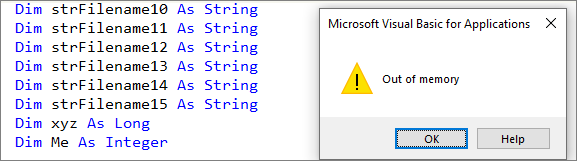 Affects all current versions of Access and release channels. Workaround: Significantly reduce the number of unique identifiers and/or move some code into a separate library database | 2026-10-07 | Eugen Albiker Colin Riddington |
Cause confirmed by the Access team 2026-11-02 | b) | Display glitch in Shape Outline ribbon menu (FIXED) The Line Type menu text is truncated 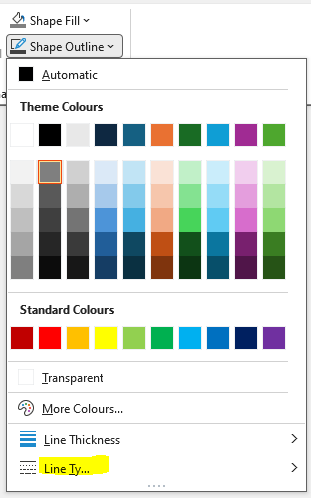 Affected Beta version 2611 build 20601.20000. Fixed in 2611 build 20606.20000 released 2026-10-08 | 2026-10-12 | Colin Riddington | Fixed in latest Beta version | c) | Using VBA code on tab control page change can cause Access to crash Crashing Issue - Access Version 2610 (Build 20527.20054) Affects version 2610 or later | 2026-10-16 | George Hepworth | Replicated by the Access team. Fix likely W/C 2026-10-26 |
d) | Textbox disappears when scrolling records in continuous form with Zoom < 100% In a continuous form a textbox becomes partially or completely invisible in some records and under certain conditions: 1. the background of the textbox is set to transparent 2. it is placed over another textbox (to apply CF) 3. zoom is set to < 100% 4. you scroll the records with the mouse 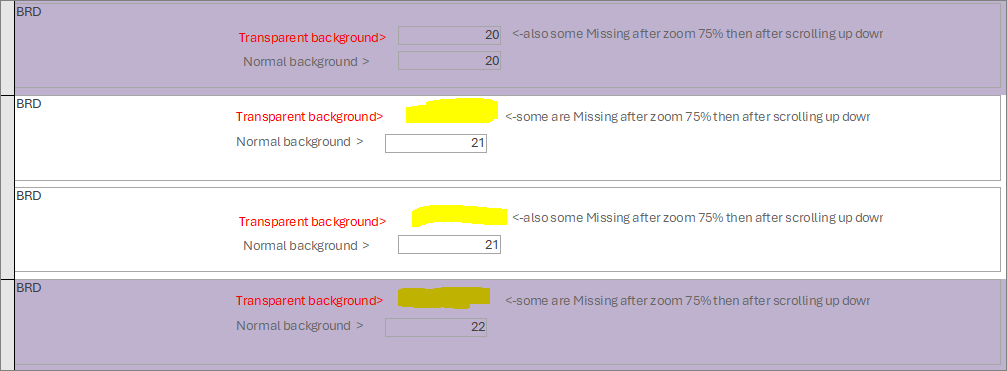 Affects version 2610 or later. See: Field disappears when zooming out below 100 Percent with mouse scrolling | 2026-10-23 | Tassimo / Karl Donaubauer | Replicated by the Access team. Will be fixed. | e) | Imported navigation form loses links to navigation controls When a working navigation form is imported into a new database together with all supporting objects, it fails to load the form navigation controls. Affects all current versions of Access but worked correctly in older versions such as Access 2010/2016 Workaround: Rebuild the navigation control links manually | 2026-10-27 | Colin Riddington |
Bug fixes in Current Channel Version 2610 Build 20527.20088 (released 2026-10-21) Return To Top
The Access team have published a blog article listing the following 11 Access fixes released in Version 2610 (Build 20527.20088)
| Item | Area | Bug information | Issue Fixed | Related Articles |
|---|---|---|---|---|
| 1. | Zoom | Datasheet subforms did not zoom with Ctrl+mouse wheel | Using Ctrl+mouse wheel over a subform displayed in Datasheet View now changes its zoom level as expected. | See Item j) |
| 2. | Zoom | Context menus appeared in the wrong location on zoomed forms | Right-click menus now open at the selected location regardless of the form's zoom level, including near the lower-right edge of the form. | See Item a) |
| 3. | Zoom | A form divider line could stop halfway across at 50% zoom | The divider between form sections now spans the full form width at 50% zoom and other supported zoom levels. | See Item n) |
| 4. | Zoom | Rapid Ctrl+mouse-wheel input could jump from 10% to 1000% zoom | Zooming out quickly now stops at the 10% minimum instead of wrapping to the maximum zoom level. | See Item p) |
| 5. | Big Forms | Horizontal scrolling could snap very wide forms back to the left | Design View and Form View can now scroll to controls positioned far to the right without the form unexpectedly returning to its left edge. | |
| 6. | Big Forms | Text formatting remained limited to 22 inches in wider controls | Text can now be formatted and displayed across the full width of fixed-size text controls wider than the former 22-inch form limit. | See Item b) |
| 7. | Forms and controls | ControlTip text could remain visible after typing began | ControlTips now close when keyboard input begins, preventing the tip from covering the form during data entry. | See Item j) |
| 8. | Forms and controls | Property Sheet text could become unreadable after changing the Office theme | The Property Sheet now refreshes both its foreground and background colors immediately after a theme change, without requiring Access to be restarted. | See Item c) |
| 9. | Queries and data | Bracketed object and control names could occasionally be read incorrectly | Access now reliably preserves a name when removing its surrounding brackets. | See Item m) |
| 10. | Stability | Opening forms with grouped control layouts could cause Access to close unexpectedly | Access no longer closes unexpectedly while determining the bounds of grouped layouts when affected forms open in Form View. | |
| 11. | Stability | Changing a subform's SourceObject could cause Access to close unexpectedly | Changing a subform's source from VBA during an event now completes without causing Access to close unexpectedly. | |
| 12. | Reports | Some databases may display an incorrect "There isn't enough memory or disk space" message when opening a report or exporting a report to PDF. | Not yet fixed. A correction is planned for the next Version 2610 update. |
See Item i) |
Bug fixes in Beta Channel Version 2611 Build 20625.20032 (released 2026-11-02) Return To Top
The information below was kindly provided by Access team member, Shane Groff, with related articles added by me. Most of the fixes listed below are currently only available in the Beta Channel but should roll out to other channels in the coming months.
| Item | Area | Bug information | Issue Fixed | Related Articles | |
|---|---|---|---|---|---|
| 1. | Productivity | The Expression Builder used a fixed, small font size | A new Access option lets users choose the Expression Builder font size, and the dialog can be resized to provide more working space. | Change the Font Size in the Expression Builder & Macro Designer |
|
| 2. | Productivity | Sending Access data by email could fail when new Outlook was installed | Sending Access data by email now works with new Outlook and provides clearer feedback when a message cannot be sent. | ||
| 3. | Forms and zoom | A Datasheet View form window did not resize when zoom changed | Forms displayed in Datasheet View now resize with the zoom level when the Zoom Resizes Window property is set to Yes. | See Item b) | |
| 4. | Forms and zoom | Controls could repaint incorrectly after keyboard navigation on a zoomed form | Text boxes and combo boxes now repaint consistently when focus returns through Tab or Shift+Tab at non-100% zoom levels. | ||
| 5. | Forms and zoom | Focused controls in a form footer could lose their top border | Text boxes and combo boxes in form footers now retain their complete border when they receive focus. | See Item c) | |
| 6. | Forms and zoom | MS Sans Serif text could develop excessive spacing at high zoom levels | MS Sans Serif text now scales more smoothly as the form zoom level increases. | ||
| 7. | Accessibility and international text | Screen readers did not announce changes to search results | Access now announces updated search-result information as users type, helping screen-reader users understand how the available results changed. | ||
| 8. | Accessibility and international text | Some Unicode characters were displayed incorrectly in field-validation messages | Field lookup and validation error messages now preserve extended Unicode characters correctly. | ||
| 9. | Controls and input | Touch interaction with an Edge browser control could prevent other controls and the ribbon from receiving focus | Forms containing an Edge browser control now retain normal focus and ribbon behavior after touchscreen interaction. | See item j) | |
| 10. | Controls and input | An open combo box could close during a background settings refresh | Open combo-box lists now remain available while Access processes background Windows settings changes, including Group Policy refreshes. | |
|
| 11. | Data and VBA | Editing conditional formatting through VBA could discard additional rules | VBA changes to conditional formatting now preserve rules stored beyond the first three. | See item d) | |
| 12. | Data and VBA | TransferText could not use filenames containing multiple periods | DoCmd.TransferText now supports valid Windows filenames containing multiple periods, including filenames that also contain number signs. |
Feedback Return To Top
Please use the Email button in the contact form below to let me know whether you found this article interesting/useful or if you have any questions/comments.
Please also consider making a donation towards the costs of maintaining this website. Thank you
| Colin Riddington | Mendip Data Systems | Last Updated 5 Nov 2026 |
|---|
|
Return to Bugs & Fixes Page
|
Return to Top
|